Need help?
Do you have a question about the Liyama G-Master GB2760QSU and is the answer not in the manual?
Warnings for safe operation, cabinet removal, object insertion, water use, power supply, and cables.
Cautions regarding installation location, hazardous positions, ventilation, cable handling, and ergonomics.
Instructions for cleaning the LCD panel and cabinet, including prohibited solvents.
Lists key features like resolution, contrast, response time, FreeSync, and connectivity.
Step-by-step guide for connecting the monitor to the computer and audio equipment.
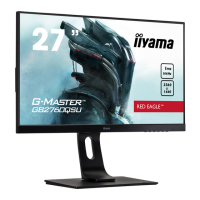
Instructions for adjusting monitor height (up to 130mm) and viewing angle (45° left/right, 22° up, 5° down).
Guide to using buttons to navigate OSD menus, adjust settings, and save changes.
How to select between DVI, HDMI, DisplayPort, or auto-detect input sources.
Explains the monitor's power saving feature and indicator lights.
Steps to resolve issues where the picture does not appear.
Steps to resolve issues with screen synchronization.
Steps to resolve screen shaking and no audio output issues.
Steps to resolve issues with audio levels being too loud/quiet or strange noises.
Detailed technical specifications of the LCD panel, including size, brightness, contrast, and response time.
Technical details on supported sync frequencies and native/max resolutions.
Information on input connectors, USB standard, audio connectors, and speakers.
Table listing compliant video modes, horizontal, vertical frequencies, and dot clock.
 General
| Screen Size | 27 inch |
|---|---|
| Resolution | 2560 x 1440 |
| Refresh Rate | 165 Hz |
| Response Time | 1 ms |
| Panel Type | IPS |
| Brightness | 400 cd/m² |
| Contrast Ratio | 1000:1 |
| Color Gamut | sRGB 100% |
| VESA Mount | 100 x 100 mm |
| Adaptive Sync | FreeSync Premium |
| Connectivity | HDMI, DisplayPort |
| USB Hub | USB 3.0 x2 |

 To Next Page