1
0
2
0
3
0
4
0
5
0
6
0
-
4
-
3
-
2
-
1
+
1
+
2
+
3
+
4
1
2
1
0
8
6
4
2
by
on
o
ff
up
d
own
on
o
ff
REMOTE2-LINE
ELEVATIONPOWER
HORIZONTAL
SWEEP
on
o
ff
on
o
ff
®
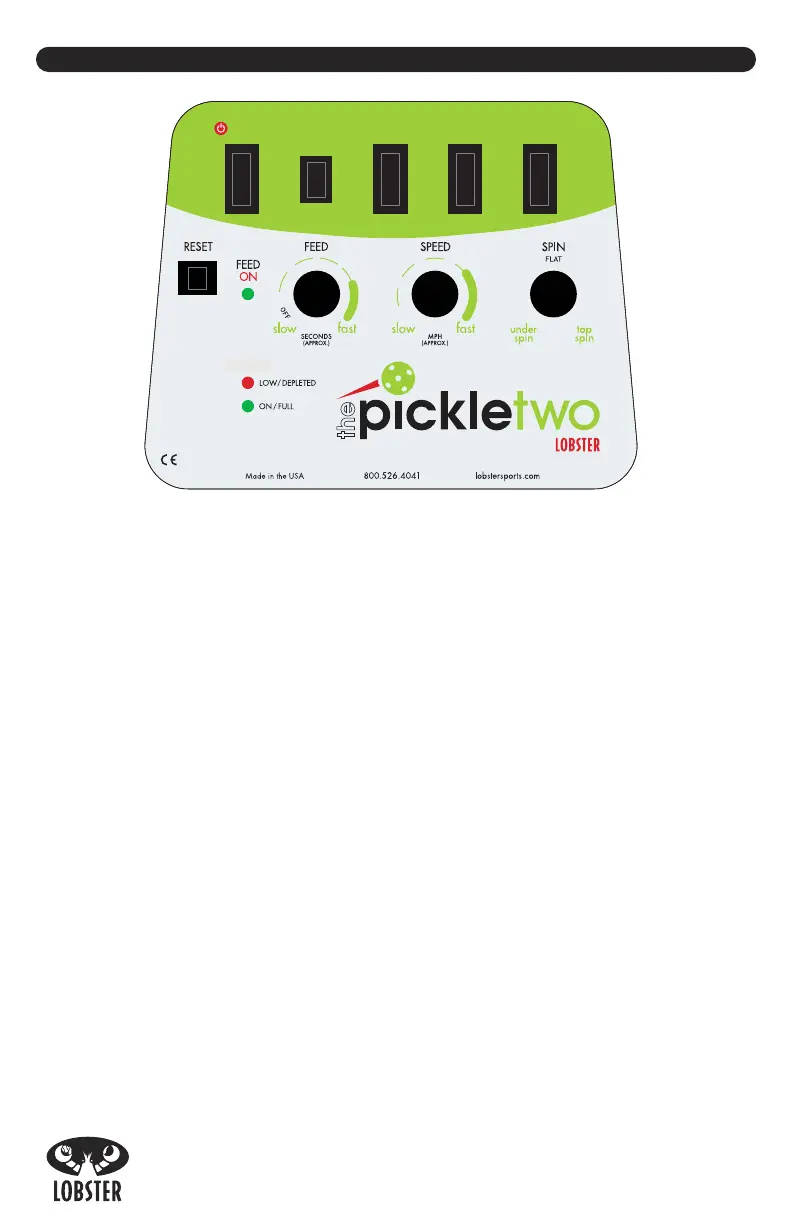
CONTROL PANEL
A. Power Switch –
Powers the machine on and off.
B. Elevation Switch –
Adjusts the ball trajectory up and down.
C. Horizontal Sweep Switch –
Turns on/off the random horizontal oscillation.
D. 2-Line Switch
–
Turns on/off the 2-line function.
E. Remote Switch
–
Activates the handheld remote control. (If you did not purchase a
remote, this switch is not active until you upgrade your machine from your dealer or
direct from the factory.)
F. Reset Button
–
The reset button pops out in the event of a malfunction. If the
reset button pops out, please refer to the Troubleshooting section on page 6.
G. Feed On LED – The
LED lights up when the feed motor begins to turn.
H. Feed Knob –
Adjusts feed interval between 2-12 seconds. Turn completely
counter-clockwise to turn off the feed.
I. Speed Knob –
Adjusts the speed from 10-60 mph.
J. Spin Knob –
Controls amount of under and top spin on the ball.
K
. Status Indicator
–
LED lights indicate battery level and/or machine status.
A
B C D
E
F
G
H I J
K
S
TATUS


 To Next Page