®
If you have questions about your ball machine, DO NOT contact
your dealer; please call Lobster Sports directly at 800.526.4041
TROUBLESHOOTING
Machine Errors
The electronics are programmed to help diagnose a machine error. The LED on the
control panel will flash in the patterns listed below. If the error message continues to
flash after trying the below fixes, call Lobster Customer Service at 800.526.4041 or
email support@lobstersports.com for assistance.
Additional troubleshooting information and help videos can be found on our website’s
support section. Please visit www.lobstersports.com/support/.
OPTIONAL ACCESSORIES
External AC Power Supply
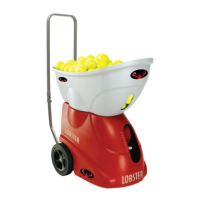
For extended court time with your battery machine, the external AC power pack
transforms our battery ball machines into an AC/DC powered ball machine. Simply
plugging the external ac power supply into your machine gives continuous,
uninterrupted use. With this option, the machine can still run off a battery, allowing
the owner to use whatever power method they prefer.
External Battery Pack
The Lobster external battery pack will provide an additional 4-8 hours of court time
and can be used with any of our pickle or elite series machines.
Storage Cover
Our heavy duty, lined, fabric storage cover protects your ball machine from the
elements, as well as from dust and moisture when in storage.
2 flashes, pause,
2 flashes, pause
3 flashes, pause,
3 flashes, pause
4 flashes, pause,
4 flashes, pause
5 flashes, pause,
5 flashes, pause
LED INDICATORS MACHINE ERROR
Feed motor error - If the feed wheel jams, turn machine off, remove
jammed ball, and turn the machine back on.
Top serve motor error - Turn machine off, check for jammed balls,
remove case, remove jammed ball, close case and turn machine on.
Bottom serve motor error - Turn machine off, check for jammed balls,
remove case, and remove jammed ball, close case and turn machine on.
Sweep motor error - Turn machine off, check for any impediment to
ability to sweep, remove it, and turn machine on.


 To Next Page