22
WIRELESS WINDOW/ DOOR SENSOR
Bonus
Adding wireless door/window sensor is optional. For extra peace of mind
we have included a wireless sensor you can use to replace the pre-wired
sensor or use it for another door or even for a window. We recommend
installing this sensor as it provides the ability to verify that your door or
window is securely closed and it also sends push notifications to your
phone on the status of your door or window when someone opens and
closes the it.
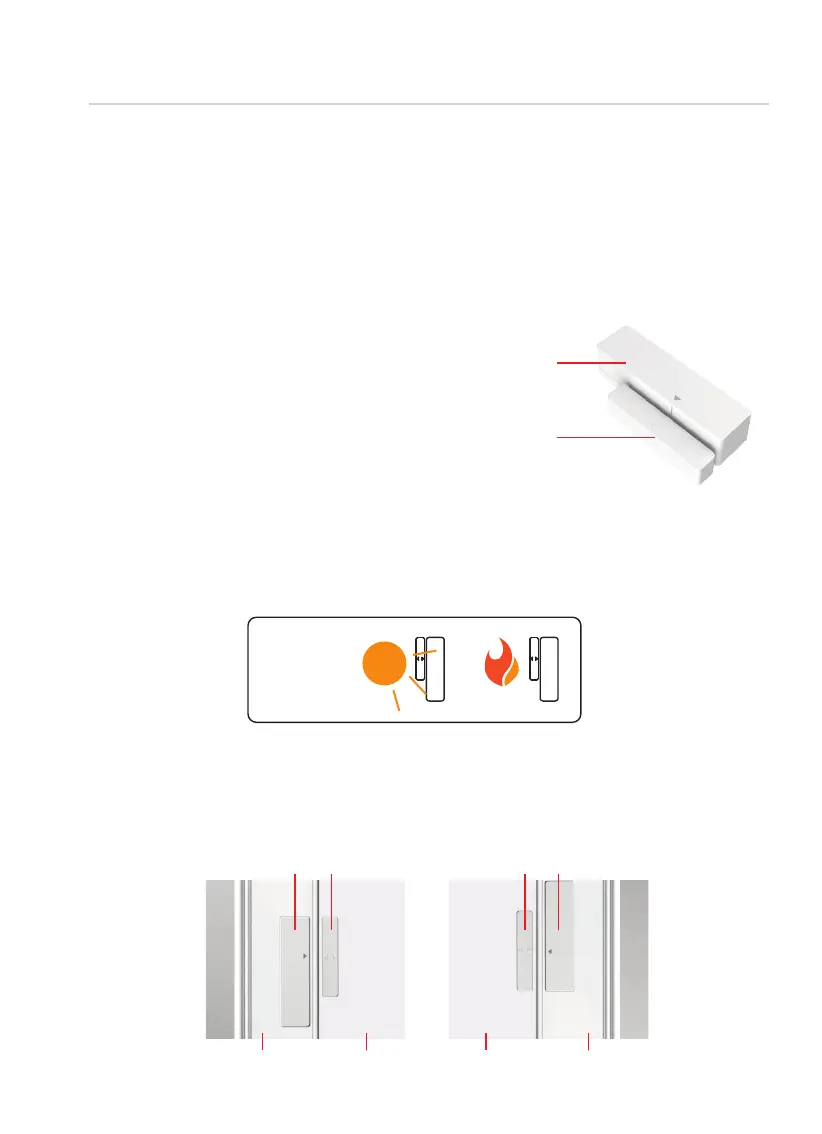
This sensor comes in two parts.
Depending on your door or
window orientation, the sensor
can be mounted in different
ways.
Part 1 - Door
Frame Sensor
Part 2 - Door
Sensor Magnet
Preparation
Make sure you install the Sensor indoors on a clean and dry surface.
Gently wipe the surface of your door or window and door or window
frame where you wish to install the Sensor and make sure it’s dry before
installing. DO NOT INSTALL YET.
Keep the Sensor away from direct sunlight, high heat locations and
large metal objects that may interfere with wireless signals.
KEEP
AWAY
Sensor Magnet
Frame Door/Window
Door/Window Frame
Sensor Magnet
Sensor
WHEN FACING
YOUR DOOR/
WINDOW FROM
THE INSIDE, THE
HINGES ARE ON
THE RIGHT SIDE
WHEN FACING
YOUR DOOR/
WINDOW FROM
THE INSIDE, THE
HINGES ARE ON
THE LEFT SIDE
The optimal location to install the Sensor is on the upper corners of your
door or window, away from the reach of children and pets.
It is simple and very easy to install anywhere and it only uses AAA battery
for long and optimal operation.



 To Next Page