23
Bonus
WIRELESS WINDOW/ DOOR SENSOR
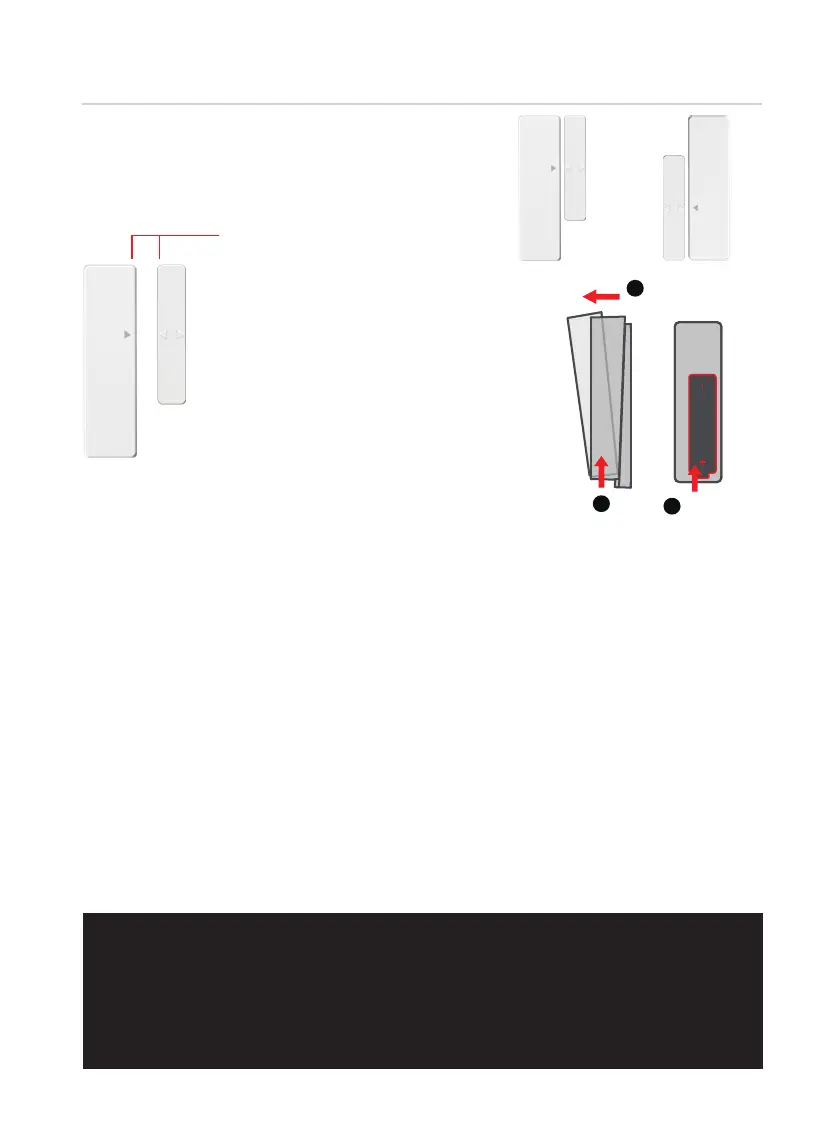
When you are installing the Sensor,
make sure the arrows on the Sensor is
placed next to the arrow of the
Sensormagnet.
OR
When installed on your door or
window, the distance between
the Sensor and the Sensor magnet
must be less than 3/4” in order
for the sensor to work.
Gap - less than 3/4”
when installed.
Install the battery
Open the sensor as shown, put
in 1 AAA battery, please pay
attention to the positive and
negative poles of the battery.
Pairing Security Sensor
The wireless Security Sensor is pre-paired with the smart lock and you do not
need to manually pair it. If you have replaced or deleted the sensor, you
will need to pair it again following these steps:
In the Lockly App, go to Settings>Secure Link/ Sensor, then select “Add
new sensor” , then “Add Wireless Sensor”. Lockly continuously optimizes
user experience, please follow the actual screen instructions on the app.
After pairing, you can customize the name of the sensor. To test if the
sensor is working, align the arrows of the sensor and magnet sensor. The
sensor will blink blue. Then separate the magnet away from the sensor,
you will receive an App notification that door/window (or your custom-
ized
name for the sensor) is unlocked. The security sensor can be used
even for cabinets, drawers, refrigerators, sliding doors/windows and other
areas of your home that requires monitoring of opening and closing.
IMPORTANT: (1) Do not allow the battery to corrode or leak as this
may cause permanent damage to the product. (2) Make sure to insert
battery on correct polarity as shown inside the battery compart-
ments. (3) Do not use rechargeable batteries. (4) When battery is
drained, do not dispose with normal household waste. Dispose via
suitable recycling center. DO NOT BURN.
RE-INSERT
BATTERY
SLIDE
LIFT
3
2
1



 To Next Page