5
2. Using the
Secure Link Wi-Fi Hub
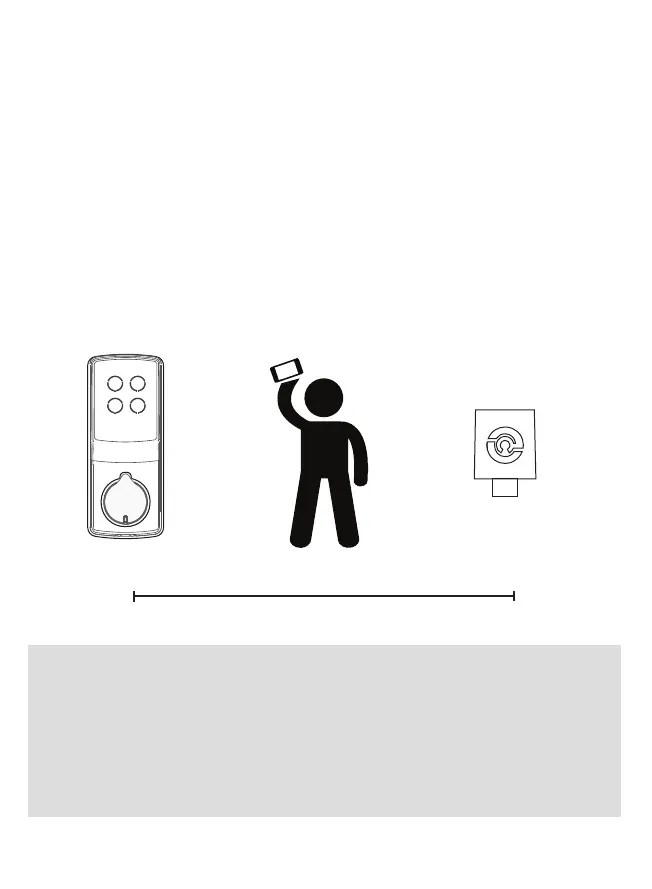
During the setup process position yourself between the lock
and the Secure Link Wi-Fi Hub—ideally no more than 30 feet
(9 meters) apart. Ensure your iOS or Android device has both
Bluetooth and Wi-Fi enabled.
30 Feet (9 Meters)
Distance Between
LOCKLY
®
Smart Lock
PGD728 Series Shown
as reference only
Secure Link Wi-Fi Hub
Part A Shown Above
as reference only
You
Using an iOS or Android
Device with Bluetooth & Wi-Fi enabled
TIP: The Secure Link requires a strong wireless signal for optimal
performance. Make sure the Secure Link will be installed in a
location with a strong 2.4 Ghz wireless signal. Sometimes distances
between Wi-Fi hub and lock can vary due to circumstances. If you
are having difficulty setting up optimal range of 30/ft or less, we’re
here to help. Call our customer care team: (669) 500 8835, or visit
LOCKLY.com/help for suggestions and troubleshooting tips.


 To Next Page