5
Ⅲ、Function and Operation
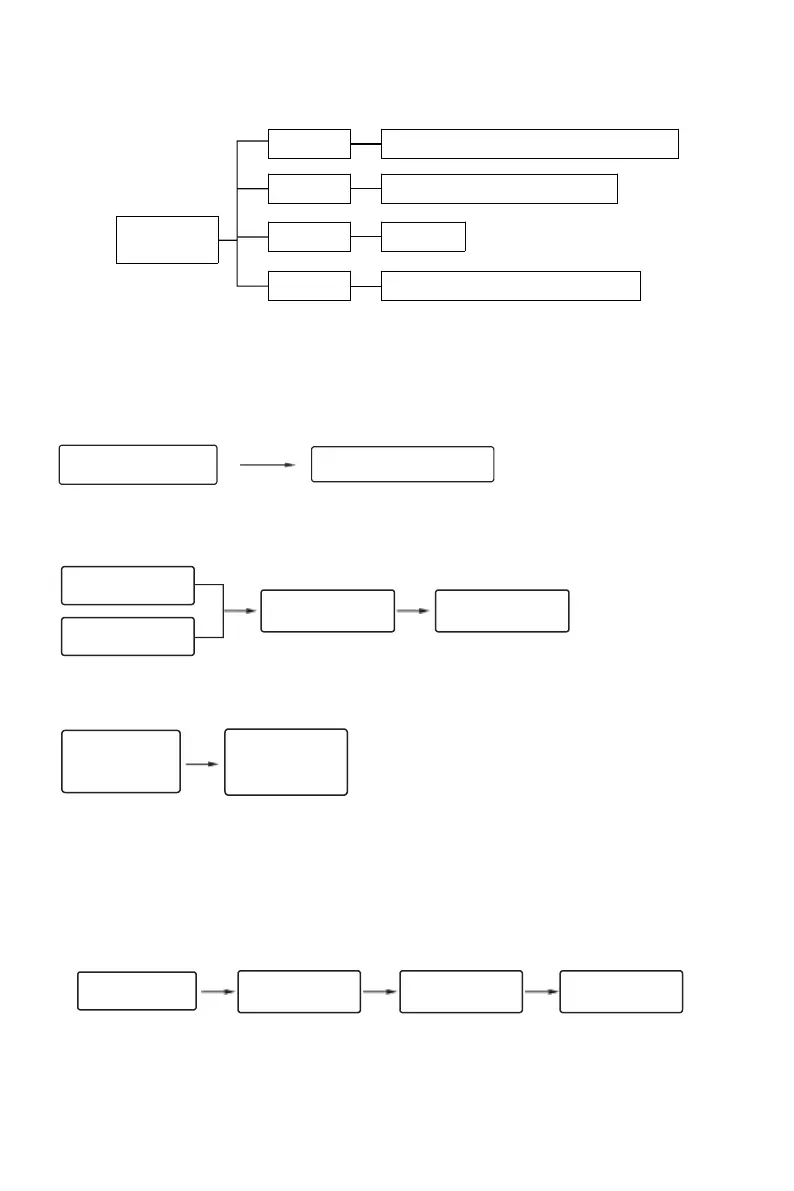
3.1Function menu topology diagram
3.2 Function and Operation
1. Initialize the system
Factory defaut management password is "123456" can unlock the door;
Before use, change the management password to access the menu function.
2. Operation rules
For the first time, you need to add a set of management passwords, and the initial password is 123456.
Enter in new management password
The "#" key is the confirm key or the function key for entering the menu. After entering the menu, press "#" to play the voice
repeatedly.
The * key is the clear or back key. When enter a password, press to clear the input
3. Access the door lock function
Light up touch screen
and press "*#"
After the touch screen is lit up, press "* #" or "Set" on the rear panel to prompt you to verify the management password (the
initial password is 123456). After the verification passes, you can enter the door lock function management.
As shown in the picture:
Verify administrator
information
Audio broadcast order:
"Please verify administrator information" → "Administrator verification succeeded" → "1 Door lock function" → "2 Delete
user" → "3 Mute Mode" → "4 Add Administrator"
4. Set Admin
◆ Enter administrator information
Enter the door lock function menu, select 'Add Administrator', select the type to be added, and perform operations
according to the display and voice prompts.
As shown in the picture:
Verify administrator
information
Audio broadcast order:
“" Verify administrator information" → "4, Add Administrator" → "( Input fingerprint, password, and card as prompted)" →
"xxx added successfully"
* Note: The information that has already been input cannot be entered. The added ID is automatically added in sequence,
the password digit is 6 to 12, the total number of administrator users is 9, and the number 001the password is entered for
the first time.
* Enter to add a new administrator password, the initial password automatically invalid.
Please enter in unlock ways(Fingerprint/Password/Card)
Enter in unlock ways(Fingerprint/Password/Card)
1. Add a user
2. Delete a user
3. Mute mode
4. Add an administrator
Enter in the series number you would delete.
Verify management password
Verify management
password
Press *+# and then
enter ADMIN
password+#
Succeeded in adding
ID: 001
Enter the fingerprint,
password, and card
you want to add


 To Next Page
 Loading...