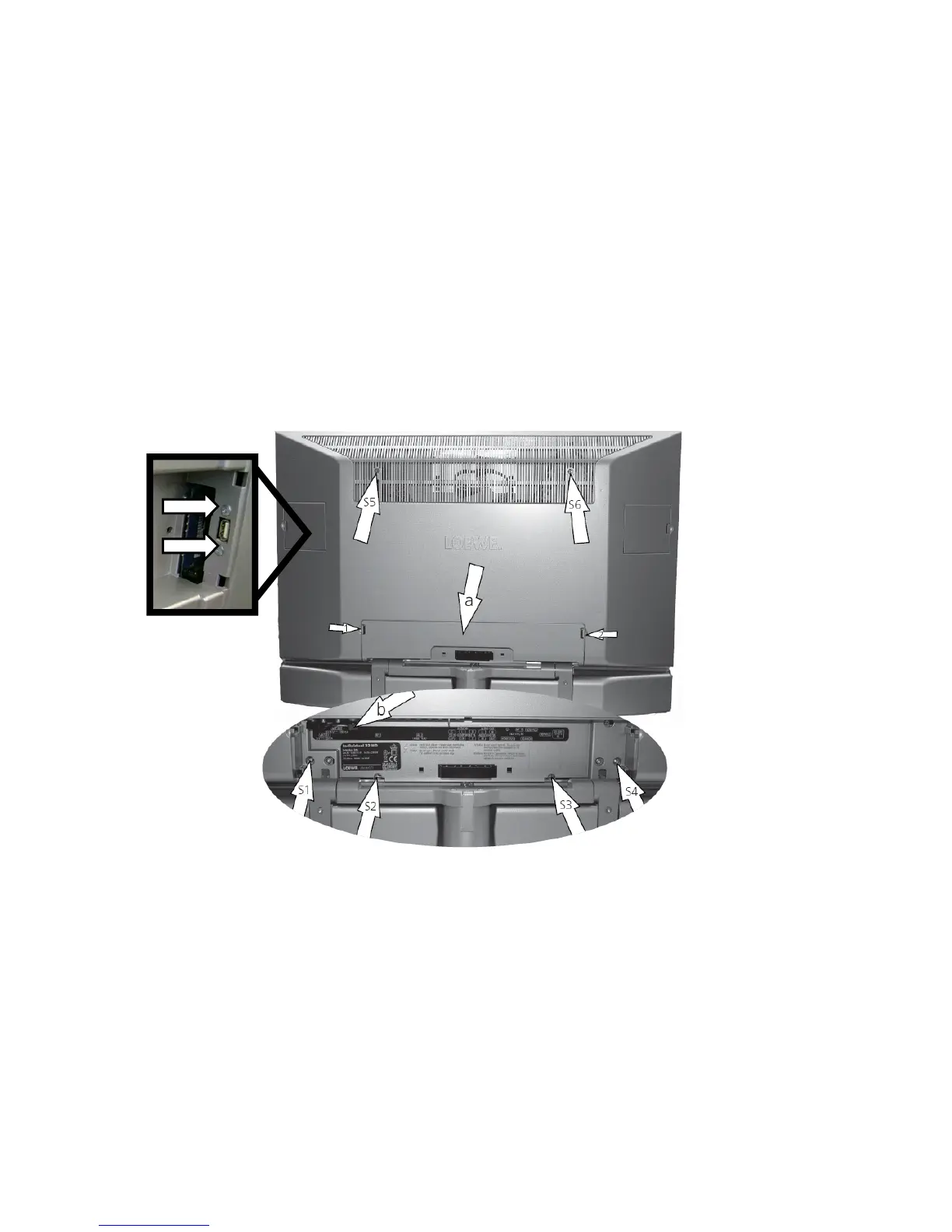
TV-Gerät öffnen
Ziehen Sie den Netzstecker!
Entfernen Sie die Anschlussleitungen vom TV-
Gerät.
Lösen und entfernen Sie, entspr
echend des TV-Gerätemodells, die auf der entsprechenden Skizze mit Pfeilen (S1-13)
markierten
13 Schrauben vom Typ M4 Tx20.
Nehme
n Sie, nachdem Sie die Schrauben entfernt haben, die Rückwand vorsichtig nach hinten ab. Achtung! In der
Rückwand sind link
s die USB-Buchse und auf der echten Seite die Frontbuchsen eingebaut. Ziehen Sie die Kabel vom
Signalboard ab bevor Sie die Rückwand
wegnehmen. Alternativ können Sie die USB-Buchse mit den Schrauben S14-15
entfernen.
(Zum Ein
setzen der Rückwand verfahren Sie entsprechend umgekehrt.)
Opening the TV set
Pull out the mains plug!
Remov
e the connecting cables from the TV set.
Loosen and remove the
13 screws (Type M4 Tx20) marked with arrows (S1-13) in the corresponding illustration according
to the T
V model.
The back cover can be moved c
arefully rearwards once the screws have been removed. Attention! The USB socket is
fixed at the left side of the back cover and the front sockets at the right side. Disconnect the cables at the Signalboard
before
you remove the back cover finally. Alternatively you can remove the screws S14-15 at the USB socket.
(Proceed in reverse order to insert the rear panel.)
S15
S14
Individual 32 Selection HD







 To Next Page