Loewe bild
User handbook
176
1
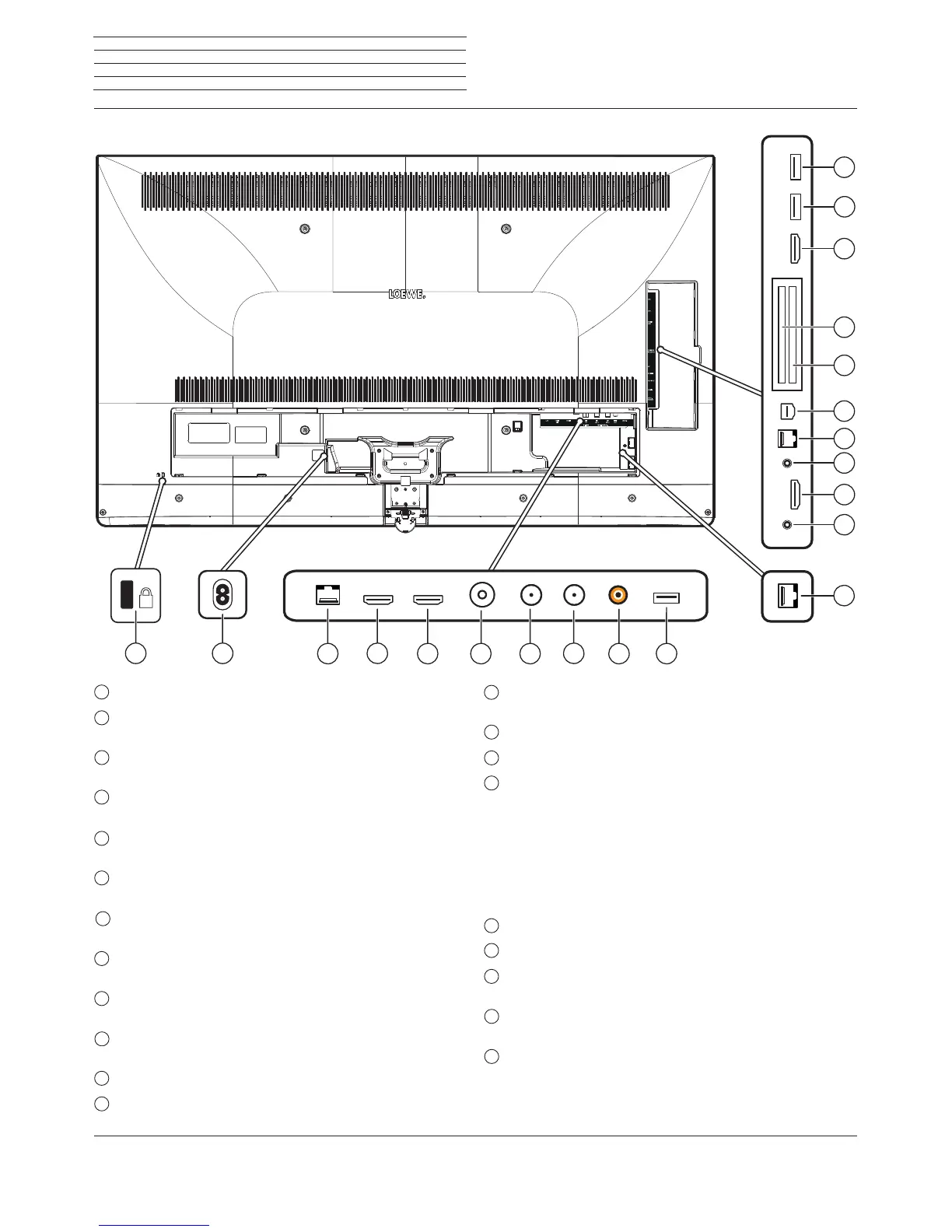
Slot for Kensington lock
2
AC IN - Mains connection
Mains socket – 220-240 V ~ 50 / 60 Hz
3
LAN - Network connection
RJ-45 – Ethernet / Fast Ethernet
4
HDMI 1 ARC - HDMI input 1
(3
(with Audio Return Channel)
HDMI – Digital Video IN, Audio IN/OUT
5
HDMI 2 - HDMI input 2
(3
HDMI – Digital Video IN, Audio IN
6
ANT TV - Antenna/cable analogue /
DVB-T/T2 / DVB-C
IEC socket – 75 Ohm / 5 V / 80mA
7
ANT SAT 1 - Satellite antenna (Sat tuner 1) DVB-S/S2
F socket – 75 Ohm / 13/18 V / 500mA
8
ANT SAT 2 - Satellite antenna (Sat tuner 2) DVB-S/S2
F socket – 75 Ohm / 13/18 V / 500mA
9
SPDIF OUT - Audio output (digital)
Cinch socket (orange)
10
USB 3.0 - USB connection
USB type A – USB 3.0 (max. 900mA)
11
DIGITAL AUDIO LINK - Surround audio outputs (digital) – (RJ45)
(1
12
HEADPHONE - Headphone connection
Jack 3,5 mm – Headphones 32–200 Ohm
13
HDMI 3 - HDMI input 3
(3
HDMI – Digital Video IN, Audio IN
14
AUDIO OUT - Audio output (analogue) L/R – (
Jack 3,5 mm)
15
RS-232C - Serial interface
(2
– (RJ12)
16
AV - Micro AV socket
(2
Audio/Video IN with Scart adapter:
Y/C (S-VHS/Hi 8)
CVBS (VHS/8 mm)
RGB
L/R
Audio/Video IN with VGA adapter:
PC/STB video signal
Component (YPbPr)
L/R
17
COMMON INTERFACE - CI slot 1 (standard V1.3)
18
COMMON INTERFACE - CI slot 2 (standard V1.3)
19
HDMI 4 - HDMI input 4
(3
HDMI – Digital Video IN/Audio IN
20
USB - USB connection
USB type A – USB 2.0 (max. 500mA)
21
USB - USB connection
USB type A – USB 2.0 (max. 500mA)
Connections rear side of the device (bild 3.55/bild 3.48/bild 3.40)
(1
Availability varies based on the device type (see Chapter Technical data - Equipment features for your TV-set).
(2
The adaptor is available as an accessory from your dealer.
(3
Before connecting an external device, please note that, the individual HDMI-ports can work with a range of different signals, see chapter Technical data, section bild
(across sets) – Signals via HDMI/AV (PC IN).
K
3
4



 To Next Page