53
english
Loewe bild | Extended operating instructions
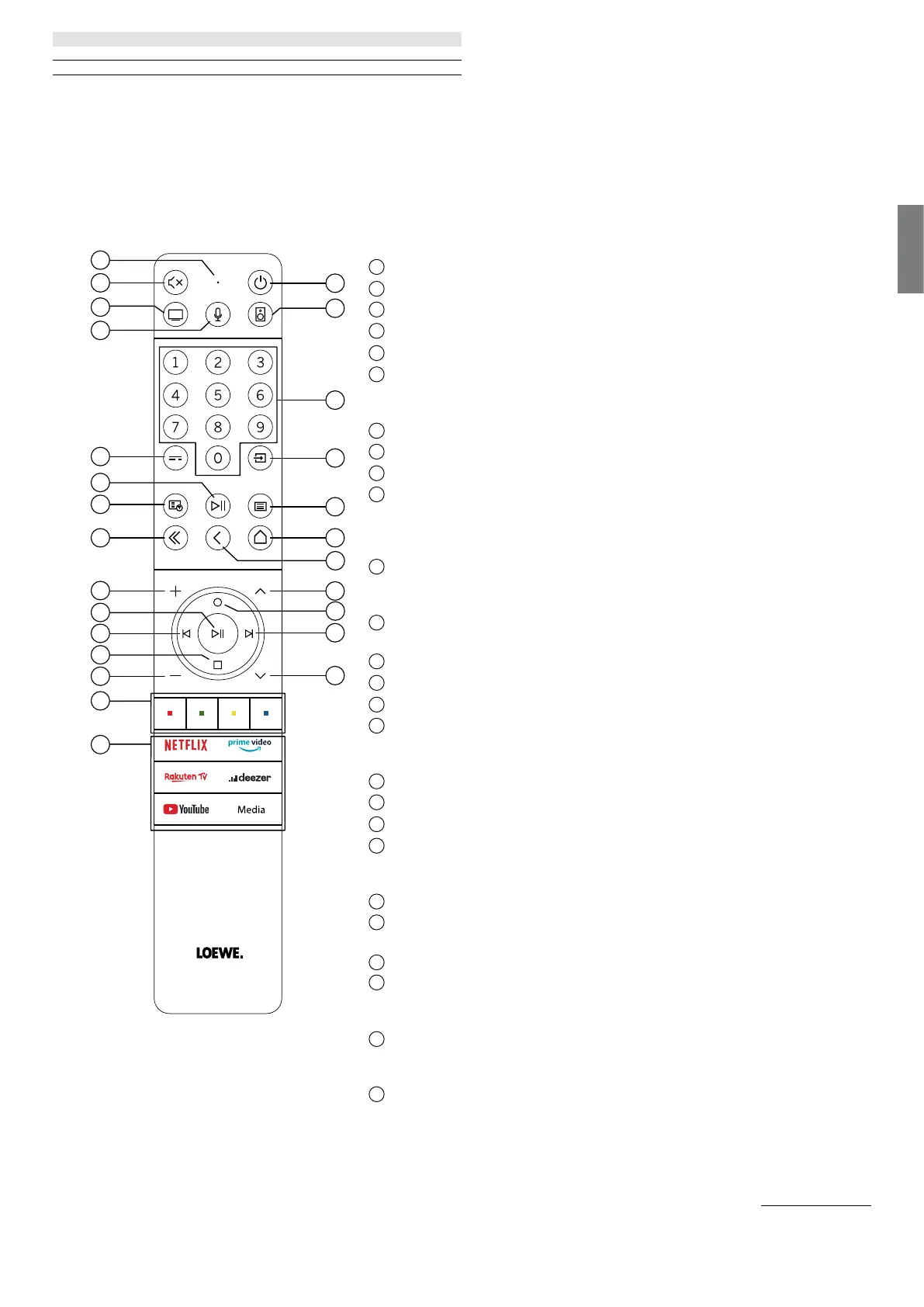
Remote control button mapping
Depending on the application (TV / video / audio / photo / apps) and function (for example, dr+, EPG, PIP, Teletext, HbbTV etc�), the key
assignment can deviate from the assignment described here�
1
Microphone
2
Sound mute / on�
3
Call the TV mode�
4
Press and hold to speak to voice assistant�
5
EPG (Electronic Programme Guide) on / off�
6
Pressing briefly: Play / Pause media or Start / Pause / Continue the timeshift tele-
vision�
Pressing longer: Display illuminated media control keys�
Teletext / MediaText on / off�
8
Exit displayed menu / application�
9
Increase volume�
When not illuminated: Call channel list�
When illuminated: Play / Pause media or Start / Pause / Continue the timeshift tele-
vision�
In the menu: Confirm selection
When not illuminated: Move left in menu or Start / Pause / Continue the timeshift
television�
When illuminated: Skip backwards
When not illuminated: Move down in menu or open the Search menu�
When illuminated: Stop / End timeshift (return to live image)�
Decrease volume�
Colour buttons – Execute corresponding function at that time�
Access the media and video on demand�
Switches the TV set on or switches to standby mode�
Press briefly while TV set is switched on: TV set and all CEC-enabled devices connec-
ted to the HDMI ports will be switched off to standby (System Standby)�
Call the Audio mode�
Select channels with numeric buttons directly�
Call Sources menu�
Pressing briefly: Call System settings�
Pressing longer: Initiate Bluetooth pairing, making the TV visible to other Bluetooth
devices�
Call up the Home menu�
Step / level back in the menu� While watching TV, switch to the previously watched
channel�
Next channel�
When not illuminated: Move up in the menu�
While watching TV, press to call the detailed information on the broadcast�
When illuminated: Opens Record menu�
When not illuminated: Move right in the menu or Pause the timeshift playback and
open timeshift controls�
When illuminated: Skip forwards
Previous channel�
2
5
9
11
13
15
7
8
3
4
6
1
10
12
14
17
18
22
24
16
19
20
23
26
25
21
Remote control


 To Next Page
 Loading...