463-0620-01 Rev A. June-201517
620 Operation and Troubleshooting Guide
plus
CAN
®
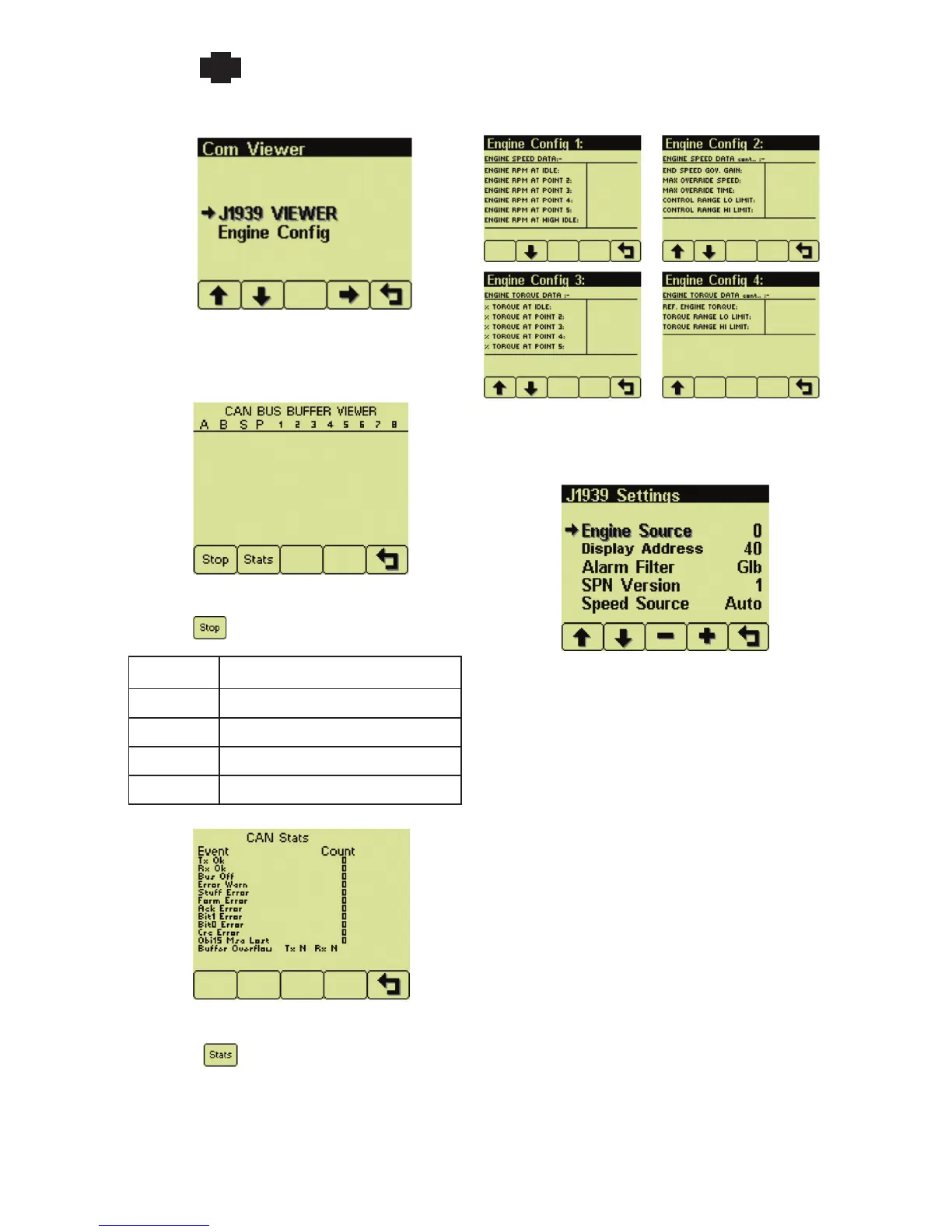
Com Viewer Engine Config
Display raw J1939 data and engine configuration
J1939 Viewer
Scrolling display of raw J1939 data
Button 1 freezes the scrolling display
Column Value (hexadecimal)
A and B PGN (Parameter Group Number)
S source address
P Priority
1 thru 8 Data bytes
Button 2 shows message statistics
Display engine configuration from ECU
J1939 Settings
Set J1939 options
Engine Source
Set gauge data engine J1939 address
Each J1939 device has a unique address to
identify the data source. Gauge data is only
displayed from the engine (Engine 1, address 0,
default) and transmission (Transmission 1, address
3, default).
Note: Incorrect Engine Source address will
result in limited or no gauge data.
Display Address
Set display J1939 address
The default address (40) will work for most
applications.
Note: Incorrect Display Address can result
in data collisions on the CANbus.
Alarm Filter
Select alarm filtering


 To Next Page