463-0620-01 Rev A. June-201518
620 Operation and Troubleshooting Guide
plus
CAN
®
Glb (global, default) – display all faults
Src (source) – display engine and transmission faults
SPN Version
Set SPN (Suspect Parameter Number) conversion
version
Version 1 (default), 2 or 3
New J1939 devices use version 4 to send
diagnostic messages. Version 4 is automatically
detected but decoding must be selected for older
devices.
Note: Consult the device supplier to
determine the correct SPN conversion
method.
Speed Source
Set speedometer source
Speed Source Off (disabled)
Auto (default)
Wheel (SPN 84)
Nav (SPN 517)
Auto uses Wheel (SPN 84) if available or Nav
(SPN 517).
Off disables all speed monitoring.
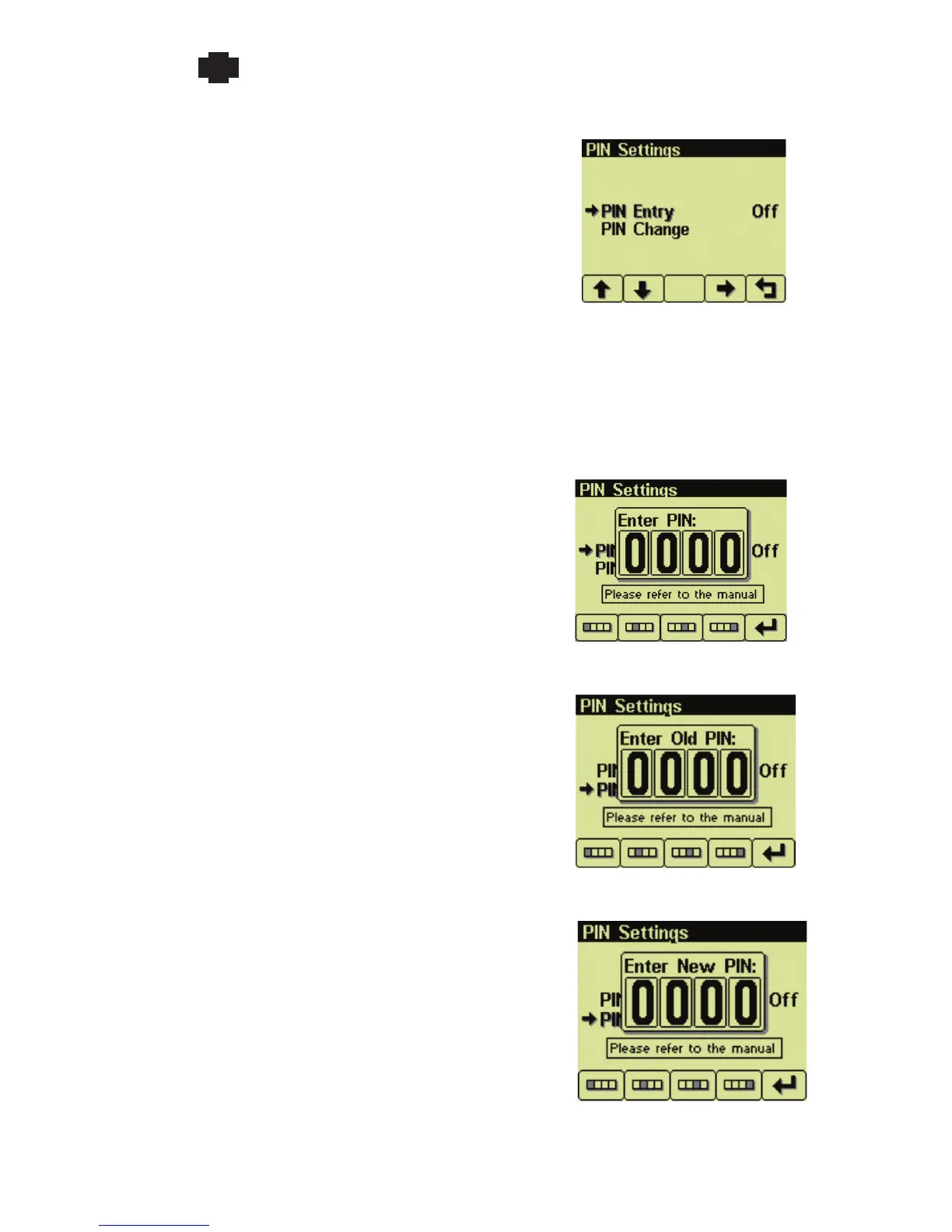
PIN Settings
Control configuration access
PIN Entry
Enable (On) or disable (Off, default)
The current PIN (1111, default) must be
entered to enable PIN Entry.
PIN Change
Current PIN Prompt


 To Next Page