463-0620-01 Rev A. June-20158
620 Operation and Troubleshooting Guide
plus
CAN
®
Note: Idle RPM, Intermediate RPM and Run RPM are adjustable in the configuration menu. Minimum
Requested RPM and Maximum Requested RPM are generally only configurable using the CANplus
Configuration Kit. See Configuration below for more information.
CANplus Display
Soft buttons simplify the operator interface by displaying a button bar above the buttons when any of
the first 4 buttons (buttons 1 to 4 counting from the left) are pressed. Icons on the button bar represent
the current function of each button. The button bar disappears after 5 seconds if no further buttons are
pressed.
Note: Different software versions may have slightly different displays.
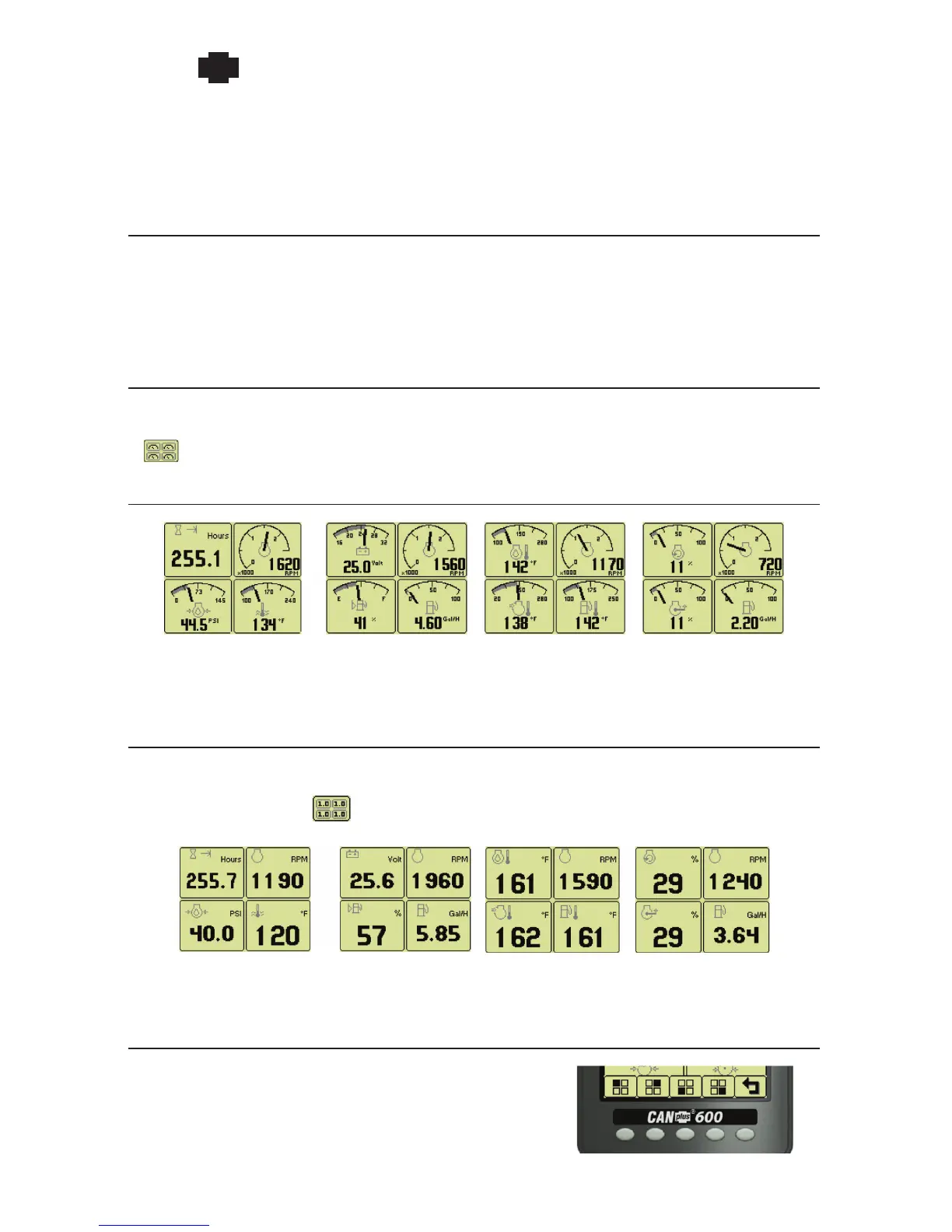
Analog Gauge Pages
Analog Gauge Pages provide four independent pages of analog gauges. Analog Gauge Pages are
selected by pressing any of the first 4 buttons to show the top level button bar and then pressing button
1 . The four gauge pages are selected by repeated pressing of button 1.
Default Gauge Pages
Page 1 Page 2 Page 3 Page 4
Note: Engine Hours are displayed as a digital value on Analog Gauge Pages. The default gauge
pages show 13 selections since the tachometer is the upper right gauge of each page.
Digital Gauge Pages
Digital Gauge Pages display the same data as the Analog Gauge Pages but in digital only format.
Digital Gauge Pages are selected by pressing any of the first 4 buttons to show the top level button bar
and then pressing button 2 . The four gauge pages are selected by repeated pressing of button 2.
Page 1 Page 2 Page 3 Page 4
Note: Engine Hours are displayed as a digital value on Analog Gauge Pages. The default gauge
pages show 13 selections since the tachometer is the upper right gauge of each page.
Modifying Gauge Configuration
All 16 gauges may be configured using Quad Adjust
(disabled by default). When Quad Adjust is enabled,
the icon for


 To Next Page
 Loading...