5
Logan Graphic Products Inc., 1100 Brown Street, Wauconda, IL 60084 Toll Free 1 800 331 6232 www.logangraphic.com
Instruction Manual
Model F300-1
Studio Joiner
Horizontal Plane
Spacer
Needed
Spacer
Needed
No Spacer
Needed
No Spacer
Needed
Fig. 10
Preparation continued
C. Moulding Spacer
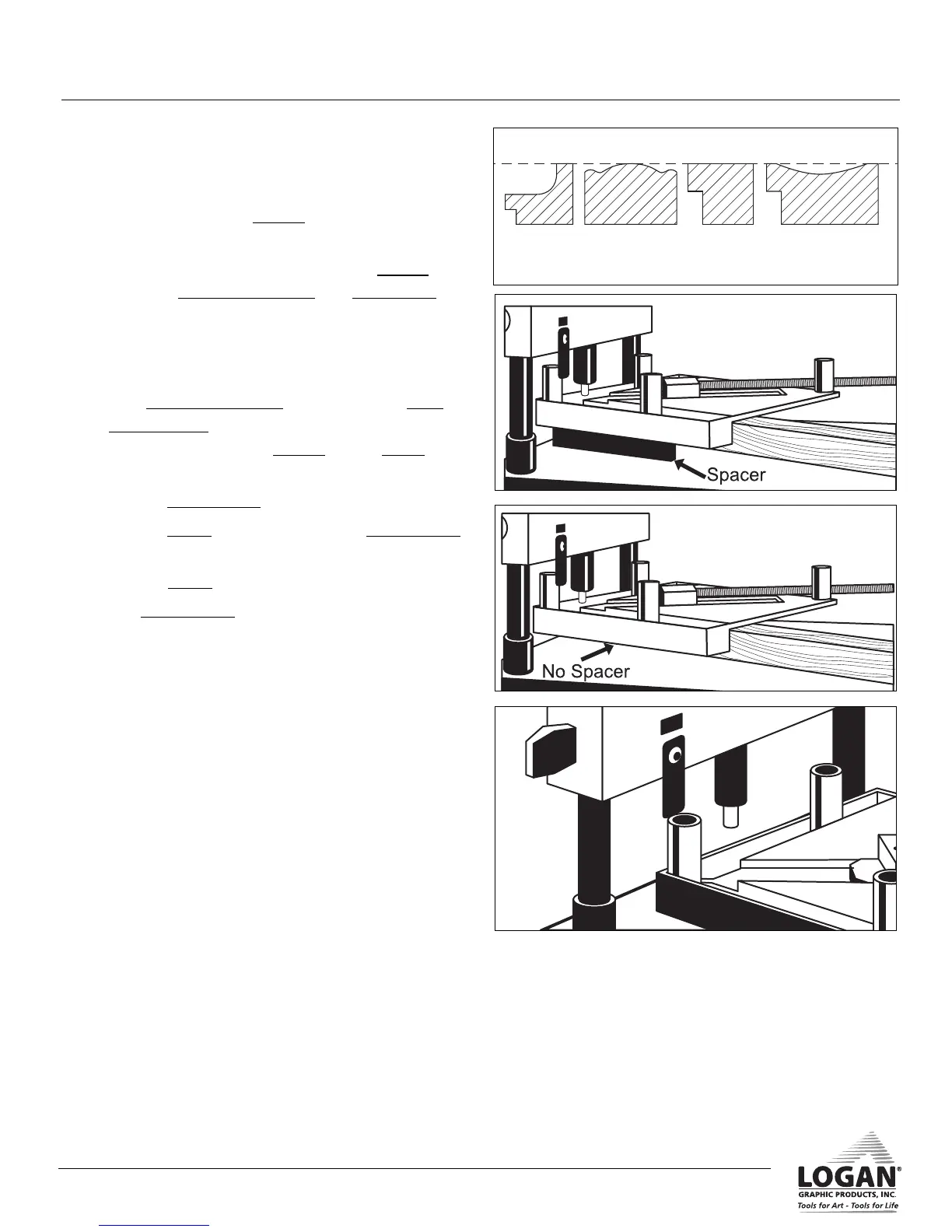
1. Moulding must have support for V-nail to drive
into wood. Use the spacer when moulding is
not even with horizontal plane (Fig. 10).
2. With rubber edges facing up, place spacer
between clamped moulding and base board
(Fig. 11).
D. Adjust Beam Height
1. Turn clamped moulding over and lay on base
board spacer (Fig. 12). If using spacer, position
clamped moulding on spacer where V-nail is to
be pressed in.
2. Line up depth gauge with vise post.
3. Loosen knobs and adjust beam so depth gauge
lightly touches vise post (Fig. 13).
4. Tighten knobs.
5. The depth gauge may be pivoted either to
left or right to gain extra clearance.
L956NStudio Joiner manual R1_08.qxd:Studio Joiner 1_4_05.qxd 1/4/10 11:17 AM Page 6



 To Next Page