EasyManua.ls Logo

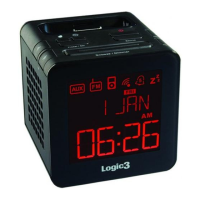
Logic3 i-Station TimeCube WIS191 - User Manual

Logic3 i-Station TimeCube WIS191
16 pages
Print Icon
To Next Page IconTo Next Page
Loading...



A6 Szie: 105 x 148.5mm

Questions and Answers

Summary

Product Overview

Setup and Settings

Set up of i-Station TimeCube

Connects the AC adapter and inserts the correct cradle for iPod/iPhone.

Setting of Time;Date

Configures the device's current time and date format, hour, minute, month, and day.

Setting of Alarm

Sets the alarm volume, recurrence, and wake-up source (hour/minute).

Setting of Sleep mode

Adjusts the duration of the sleep mode for automatic shut-off.

Setting the Radio

Tunes into radio stations and saves them to presets.

To Recall a Preset Radio Station

Recalls previously saved radio stations by cycling through preset numbers.

Switching Off the Alarm;Snooze Function

Disables the alarm temporarily (snooze) or permanently.

Selecting a Source

Chooses the audio input source for playback (iPhone/iPod, Radio, or AUX).

Adjust Display Dimmer Level

Controls the brightness level of the device's display.

Set Up of Line in

Connects external audio devices to use the TimeCube as speakers.

Troubleshooting and Warnings

Trouble Shooting

Provides solutions for common issues like unclear radio or alarm problems.

Warning

Lists important safety instructions and usage precautions for the device.

Logic3 i-Station TimeCube WIS191 Specifications

General IconGeneral
PowerAC Adapter
ColorBlack
TypeDocking Station
CompatibilityiPod
Dimensions160 x 160 x 160 mm
ConnectivityDock connector
FeaturesAlarm Clock, FM Radio
FunctionsCharging, audio playback
Audio OutputStereo

Related product manuals