This document is an instruction manual for the Logik L37S13 Soundbar.
The Logik L37S13 Soundbar is an audio device designed to enhance sound output from various sources. It features multiple input options for connectivity with different audio devices and offers sound customization through equalizer settings. The soundbar is designed for indoor use and can be placed on a flat surface or wall-mounted.
Important Technical Specifications:
- Model: L37S13
- Mains Supply: AC 110-240V ~50/60Hz
- Power Consumption: 48W
- Speaker Output Power: 20W x 2
- Net Weight: 3.4kg
- Dimension: 820mm (W) x 86mm (D) x 100mm (H)
Function Description:
The soundbar serves as an external speaker system, providing amplified and enhanced audio for televisions, media players, and other compatible devices. It can be controlled via a remote control or the buttons located on the top of the unit.
Front View Components:
- Speakers: The primary audio output components.
- Remote Control Sensor: Receives commands from the remote control.
- Display: Shows operational information, such as selected mode or volume level.
- Status Indicator: Lights up red for STANDBY mode and green for ON mode.
Top View Controls:
- STANDBY Button: Toggles the unit between ON and STANDBY modes.
- SOURCE Button: Selects the active audio input source (AUX IN, OPTICAL, COAXIAL, LINE IN).
- VOL +/- Buttons: Adjust the overall volume level.
- EQ Button: Cycles through preset equalizer settings.
Bottom View Connections:
- OPTICAL Socket: For digital audio input using an optical cable.
- AUX IN (L/R) Sockets: For analog audio input using RCA cables.
- COAXIAL Socket: For digital audio input using a coaxial cable.
- SUB-WOOFER OUT Socket: For connecting an optional external subwoofer.
- Mains Cable: For power supply connection.
Side View Connection:
- LINE IN Socket: For analog audio input using a 3.5mm stereo audio cable.
Remote Control Functions:
- Button: Switches the unit between ON and STANDBY modes.
- MUTE Button: Silences or restores the sound.
- BASS Button: Adjusts the bass level of the audio output.
- EQ Button: Selects preset equalizers.
- TREBLE Button: Adjusts the treble level of the audio output.
- SOURCE Button: Selects the input source.
- VOL +/- Buttons: Adjust the volume.
Usage Features:
- Unpacking and Setup: The manual provides a list of included items (Main Unit, Remote Control, Mounting Kits, Phono (RCA) Audio Adapter, Coaxial Cable, Instruction Manual) and advises retaining packaging for local regulations.
- Wall Mounting: Detailed instructions are provided for wall mounting, including drilling parallel holes (Ø 3-8 mm, 401 mm apart), inserting dowels, and securing the unit with screws, leaving a 5mm gap. Cushion pads are to be stuck at the back of the main unit. An electronic stud finder is recommended to check wall type.
- Connectivity Options:
- OPTICAL Connection: Connects to an audio device's OPTICAL OUT socket using an optical cable (not included).
- AUX IN Connection: Connects to an audio device's audio output sockets using an RCA audio cable and a Phono (RCA) Audio Adapter.
- LINE IN Connection: Connects to an audio device's audio output socket using a 3.5mm to 3.5mm stereo audio cable (not included).
- COAXIAL Connection: Connects to an audio device's coaxial output socket using a coaxial cable.
- Mains Supply Connection: Connects the unit to a mains socket using the provided mains cable. It is crucial to ensure all audio connections are made before connecting to power.
- SUB-WOOFER OUT Connection (Optional): Supports an external subwoofer (sold separately, recommended 50W output). The subwoofer connects to the unit's SUB-WOOFER OUT socket and is powered individually.
- General Operation:
- STANDBY Mode: The unit enters STANDBY mode with a red status indicator upon initial power connection.
- Switching On/Off: Pressing the STANDBY button switches the unit ON (display shows "HELLO", status indicator turns green) or back to STANDBY (status indicator turns red). Disconnecting the mains plug completely switches off the unit.
- Auto Standby: The unit automatically switches to Standby if the volume is near mute or idle for approximately 10 minutes.
- Selecting Modes: The SOURCE button cycles through AUX IN, OPTICAL, COAXIAL, and LINE IN modes.
- Adjusting Volume: Use VOL +/- buttons on the unit or remote.
- Mute Function: The MUTE button on the remote silences or restores sound.
- EQ (Equaliser): The EQ button on the remote cycles through preset equalizers (Flat, Rock, Pop, Classic) to suit individual preferences.
- Adjusting Bass/Treble: Use the BASS or TREBLE buttons on the remote, followed by VOL +/- to adjust respective levels.
- Remote Control Operation Range: The remote control sensor is sensitive up to 8 meters away and within a 30° arc. Operating distance may vary with room brightness.
- Battery Replacement for Remote Control: Instructions detail how to open the battery compartment, insert one AAA size battery (not included) ensuring correct polarity, and close the compartment. Warnings are provided regarding improper battery use, disposal, and handling of the remote control.
Maintenance Features:
- Cleaning:
- Always unplug the unit from the mains socket before cleaning.
- Wipe the case with a slightly moist, lint-free cloth.
- Do not use cleaning fluids containing alcohol, ammonia, or abrasives.
- Do not spray aerosol at or near the unit.
- Troubleshooting (Hints and Tips): A table provides solutions for common issues:
- No power: Check mains cable connection, ensure ON mode is selected.
- Loud hum or noise: Clean dirty plugs and sockets with a non-abrasive cleaning solution.
- Remote control not functioning: Use near the unit, point at the sensor, replace battery, remove obstacles.
- Unit not responding to buttons: Switch the unit off and on again at the mains socket to reset.
- Functional abnormality: Unplug and reconnect the unit from the mains socket.
Safety Warnings:
- Read all instructions carefully and retain the manual.
- Check voltage on rating label matches mains voltage.
- Inspect for damage after unpacking; do not operate if damaged.
- Location: Place on a flat, stable surface, away from vibrations, heat sources (radiators, gas/electric fires), and direct sunlight. Mains socket should be easily accessible. For indoor use only.
- Naked Flames: Never place candles or naked flames on or near the unit.
- Ventilation: Ensure curtains/materials do not obstruct vents. Maintain a minimum 5cm distance around the unit. Do not install in confined spaces like bookcases without proper ventilation.
- Mains Cable: Ensure the unit/stand does not rest on the cable. If damaged, it must be replaced by qualified persons.
- Interference: Do not place near appliances causing electromagnetic interference, as this may distort sound.
- Batteries: Keep loose batteries away from children (choking hazard). Dispose of correctly according to local regulations. Do not expose to direct sunlight or excessive heat. Remove batteries during long periods of non-use to prevent corrosion/leakage.
- Supervision: Children should be supervised to prevent them from playing with the unit or inserting objects into openings.
- Service: Do not remove screws or open fixed covers; refer all maintenance to qualified personnel. The unit contains no user-serviceable parts.
- Symbols: The lightning flash symbol indicates dangerous voltage, and the exclamation point indicates important operating and maintenance instructions.

 Need help?
 General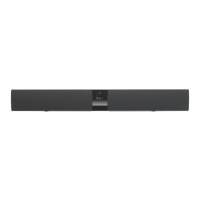

 To Next Page