
 Need help?
Do you have a question about the Logitech Craft Keyboard and is the answer not in the manual?
Guides connection via Bluetooth or Unifying receiver and software installation.
Install optimized profiles for applications to enhance the Crown feature.
Assign custom functions to F-keys using Logitech Options software.
Control backlighting brightness using function keys or Logitech Options software.
Explains LED indicators for battery status and how to manage low battery notifications.
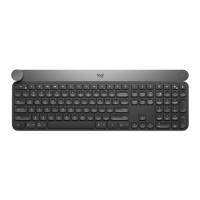
The Logitech Craft Advanced Keyboard is a sophisticated input device designed to enhance productivity and creative workflows, featuring a unique Creative Input Dial, also known as the Crown. This keyboard offers versatile connectivity options, customizable F-keys, and intelligent backlighting, making it a powerful tool for various applications.
The primary function of the Logitech Craft Advanced Keyboard is to provide a high-performance typing experience coupled with advanced control features for creative and professional applications. The standout feature is the Creative Input Dial (Crown), which is touch-sensitive and context-aware. This means its functions change dynamically based on the application being used and the specific task within that application. Users can touch, tap, and turn the Crown to access context-specific functions instantly, streamlining their workflow.
The keyboard also includes a full set of F-keys (F1-F12) that are customizable through the Logitech Options software. These F-keys can be assigned various functions, including media controls (Next, Previous, Play, Mute, Volume Up/Down), screen brightness adjustments (down/up), Task View, Action Center, Show/Hide desktop, key backlighting level adjustments (down/up), Calculator application, Print-screen, Scroll Lock, and Device Lock. This customization allows users to tailor the keyboard to their specific needs and frequently used commands, further enhancing efficiency.
Connectivity is flexible, with options to connect via a Unifying receiver or Bluetooth. The keyboard supports up to three devices simultaneously, indicated by the Easy-Switch™ buttons (1, 2, 3) located in the top left corner. Users can easily switch between connected devices by pressing the corresponding Easy-Switch™ button.
To begin using the Craft keyboard, users are advised to download and install Logitech Options software. This software is crucial for unlocking the full potential of the Creative Input Dial and for customizing other keyboard features. The setup process involves:
The Crown is designed to revolutionize application usage. It allows for intuitive interaction:
The F-keys (F1-F12) located across the top of the keyboard are fully customizable. To customize an F-key:
The Craft keyboard features full backlighting for all keys, which is essential for working in low-light conditions. The backlighting brightness can be adjusted using the dedicated F6 (brightness down) and F7 (brightness up) function keys. Users can also disable backlighting entirely through the Logitech Options software by navigating to "More settings" > "This device" and checking "Disable backlighting."
The three Easy-Switch™ buttons allow the keyboard to be paired with up to three different devices (e.g., a desktop computer, a laptop, and a tablet) and switch between them effortlessly. To switch devices, simply press the corresponding Easy-Switch™ button. The LED next to the button will indicate the active connection.
The Logitech Craft keyboard is equipped with a rechargeable lithium polymer battery. It uses a USB-C charging cable, which is provided with the keyboard. To recharge, users simply plug the USB-C cable into the keyboard and a power source.
An LED located in the top right corner of the keyboard provides visual feedback on the battery level:
The Craft keyboard also provides software notifications when the battery is running low. Users can manage these notifications through Logitech Options:
Maintaining the latest version of Logitech Options software is crucial for optimal performance and access to new features or compatibility updates. The software itself will typically prompt users for updates, ensuring the keyboard's functionality remains current. The manual also mentions firmware version information (e.g., "Firmware version: 007.000.00007") which implies that firmware updates may also be available to improve device stability and features.
In summary, the Logitech Craft Advanced Keyboard is a versatile and powerful tool designed for both general use and specialized creative tasks. Its unique Creative Input Dial, customizable F-keys, flexible connectivity, and intelligent backlighting combine to offer a highly personalized and efficient user experience, supported by robust battery management and software features.
 General
| Connection Type | Wireless |
|---|---|
| Compatibility | Windows 7 or later, macOS 10.11 or later |
| Wireless Range | 10 meters |
| Weight | 960 g |
| Charging | USB-C |
| Interface | Bluetooth, USB |
| Battery Type | Rechargeable |
| Special Features | Crown |
| Battery Life | Up to 1 week |
| Key Type | Scissor Keys |


 To Next Page