Logitech® Fold-Up Keyboard
66 English
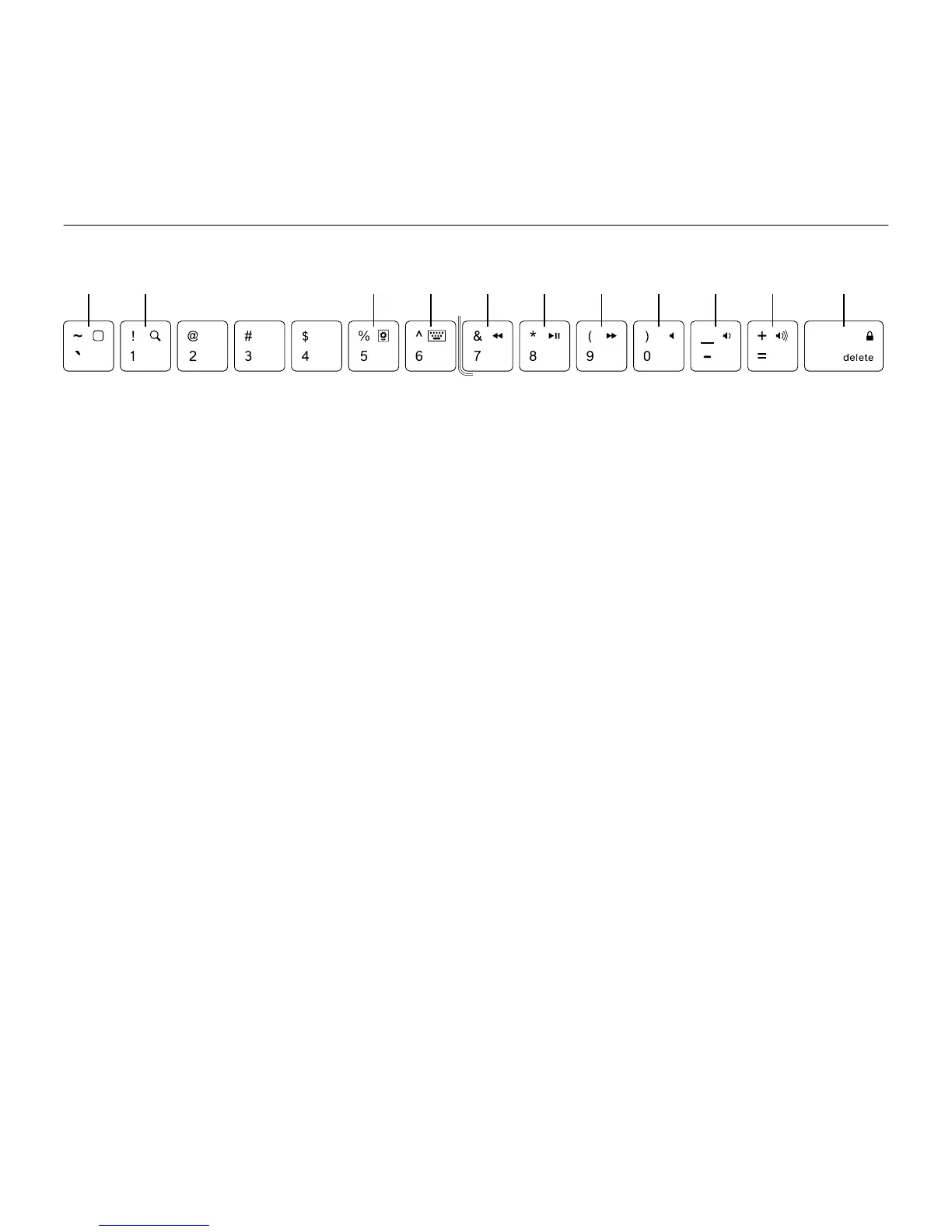
Function keys
The Fold-Up Keyboard is designed with
special function keys (F-key) for more
control of your iPad 2. To use the enhanced
functions, press and hold the fn key
followed by an F-key.
1. Home Returns you to the iPad 2
home screen
2. Search Brings up the iPad 2 search
screen
3. Slideshow Starts playing slideshow
of saved pictures
4. Virtual keyboard Allows you to hide
or show iPad 2 onscreen keyboard
5. Previous track Skips to previous track
on current playlist
6. Play/Pause Starts or stops current
playlist
7. Next track Skips to next track
on current playlist
8. Mute Mutes audio on iPad 2
9. Volume down Decreases volume
on iPad 2
10. Volume up Increases volume
on iPad 2
11. Lock Makes the iPad 2 screen go dark
and come back when pressed again
1 2 3 4 5 6 7 8 9 10 11










 To Next Page