Table of Contents
1. A Note to Reviewers ......................................................................................................................3
2. Industry Overview..........................................................................................................................4
2.1 The Problem: Complexity in the Modern Living Room.....................................4
2.2 The Opportunity........................................................................................................4
2.3 The Solution: Harmony Advanced Universal Remote Controls ......................5
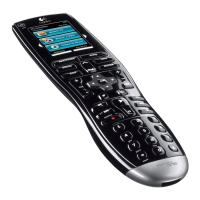
3. The Harmony 880 Advanced Universal Remote.....................................................................7
3.1 The Harmony 880 Remote: Features and Benefits............................................9
3.2 The Logitech Harmony 880 Remote Layout (PUT NUMBERS ON IMAGE)...10
3.3 Reader Info Box........................................................................................................11
4. Competitive Landscape.............................................................................................................12
5. Harmony 880 Product Specifications and System Requirements...................................13
5.1 Price............................................................................................................................13
5.2 Product Specifications...........................................................................................13
5.3 Warranty....................................................................................................................13
5.4 System Requirements.............................................................................................13
6. Easy Internet Setup with Web Wizard....................................................................................14
7. Using the Logitech Harmony 880 ...........................................................................................15
7.1 The One-Button Activity ........................................................................................16
7.2 Using the Help Button............................................................................................16
7.3 Switching Between Activities...............................................................................16
7.4 Controlling Individual Devices.............................................................................17
8. Optimizing Performance...........................................................................................................17
8.1 Customizing the LCD Screen................................................................................17
8.2 Creating a Custom Button ....................................................................................18
8.3 Teaching the Harmony 880 an Infrared Command........................................18
8.4 Adjusting the Speed Settings...............................................................................19
8.5 Custom Activities.....................................................................................................19
9. Frequently Asked Questions.....................................................................................................21
10. About Logitech Inc...................................................................................................................22
10.1 Logitech Warranty Policies.................................................................................23
10.2 How Your Readers Can Contact Us...................................................................23









 To Next Page