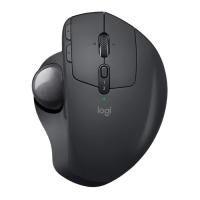
MX Ergo S
+
Bluetooth
EASY-SWITCH
SETUP
1. Turn on your MX Ergo S Trackball.
1
2
3
logi.com/optionsplus
Logi Options+
3 sec.
2. Choose how you want to connect your mouse.
• Via Bluetooth
Press and hold the Easy Switch
TM
button
atthetop of the mouse below the scroll wheel
for three seconds. This will put your mouse
in pairing mode and the LED light will start
blinking fast.
Open the Bluetooth
®
settings on your computer
to complete the pairing.
• Via Logi Bolt Receiver
Plug in the Logi Bolt receiver into the USB port
of your computer.
3. Download Logi Options+ app to get the most
out of your MX Ergo S Trackball experience.
To download and learn more about the
possibilities, go to logi.com/optionsplus.
4English



 To Next Page