
 Need help?
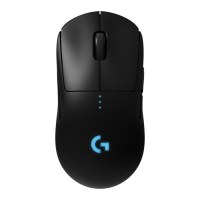
Do you have a question about the Logitech PRO WIRELESS and is the answer not in the manual?
Connect the wireless receiver to your PC via USB adapter or directly.
Turn the mouse on using the switch located on the bottom.
Download and install the Logitech Gaming Software for customization.
Connect the mouse to a PC USB port for charging or data-over-cable mode.
Keep the mouse and receiver away from wireless routers for optimal performance.
Setup for right-handed users with customizable button placement.
Setup for left-handed users with customizable button placement.
Set up the mouse with no side buttons.
Utilize all available buttons for maximum functionality.
Identifies and describes the function of each programmable button on the mouse.
Details battery life expectancy and how to check the charge level via LED indicators.
Connect via USB cable or use wireless charging for power and data.
Customize DPI, report rate, and modes via Logitech Gaming Software.
Explains LED indicators for DPI settings and onboard profiles.
Provides a link to online support for common product inquiries.
Connect the wireless receiver to your PC via USB adapter or directly.
Turn the mouse on using the switch located on the bottom.
Download and install the Logitech Gaming Software for customization.
Connect the mouse to a PC USB port for charging or data-over-cable mode.
Keep the mouse and receiver away from wireless routers for optimal performance.
Setup for right-handed users with customizable button placement.
Setup for left-handed users with customizable button placement.
Set up the mouse with no side buttons.
Utilize all available buttons for maximum functionality.
Identifies and describes the function of each programmable button on the mouse.
Details battery life expectancy and how to check the charge level via LED indicators.
Connect via USB cable or use wireless charging for power and data.
Customize DPI, report rate, and modes via Logitech Gaming Software.
Explains LED indicators for DPI settings and onboard profiles.
Provides a link to online support for common product inquiries.


 To Next Page
 General