English 1110 English
Troubleshooting
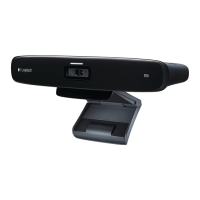
The software download fails or the TV Cam
freezes during setup
• Disconnect and then reconnect the AC power
adapter to restart the TV Cam.
• If the restart fails, reset the camera
by inserting a pin into the Reset opening
on the back of the camera. Hold down
the button for 3 seconds or until the activity
LED starts to blink.
There is no video or audio
• Your TV must be turned on and its volume
set to an audible level.
• Use your TV remote to select the HDMI input
used by the TV Cam.
• Check all of the TV Cam cable connections,
including HDMI, power, and Ethernet.
• Is your modem or router working properly?
Is there a disruption in your Internet service?
• Your caller could be experiencing Internet
or equipment issues that contributes to
the problem.
I can’t get Wi-Fi to work with my TV Cam
• Check your Wi-Fi signal strength using
a computer or mobile device. If the signal
is weak, move your router or modem
closer to your TV, or you may need to use
an Ethernet connection.
• Your Wi-Fi router or modem must be
802.11 g/n compatible.
I forgot my Wi-Fi user name and password
• Refer to your modem or router
documentation or contact the manufacturer
for assistance.
For more detailed network troubleshooting,
go to www.logitech.com/support/tvcamhd
There is poor audio/video quality
• Is the sound on mute? Try turning up
the volume on your TV.
• Reduce excessive background noise.
• If there’s an echo on either side of the call,
make sure there is at least 20 cm between
microphones and speakers.
• Increase or decrease room lighting.
Avoid sitting or standing with your back to
a sun-lit window or bright lamp.
• Your TV cam’s video image is optimized
for a 1m to 4m range (or 3–12 feet).
Images appear at their best within this range.
• Bandwidth, packet loss and other connection
elements can contribute to video quality and
image resolution. For more detailed network
troubleshooting, go to www.logitech.com/
support/tvcamhd
I’ve forgotten my Skype user name
and password
• For help, go to support.skype.com.
Clear Personal Data
• Before transferring ownership of the TV Cam,
be sure to clear your personal information
from the device. Go to Settings > General >
Clear user data.
What do you think?
Please take a minute to tell us.
Thank you for purchasing our product.
www.logitech.com/ithink




 To Next Page