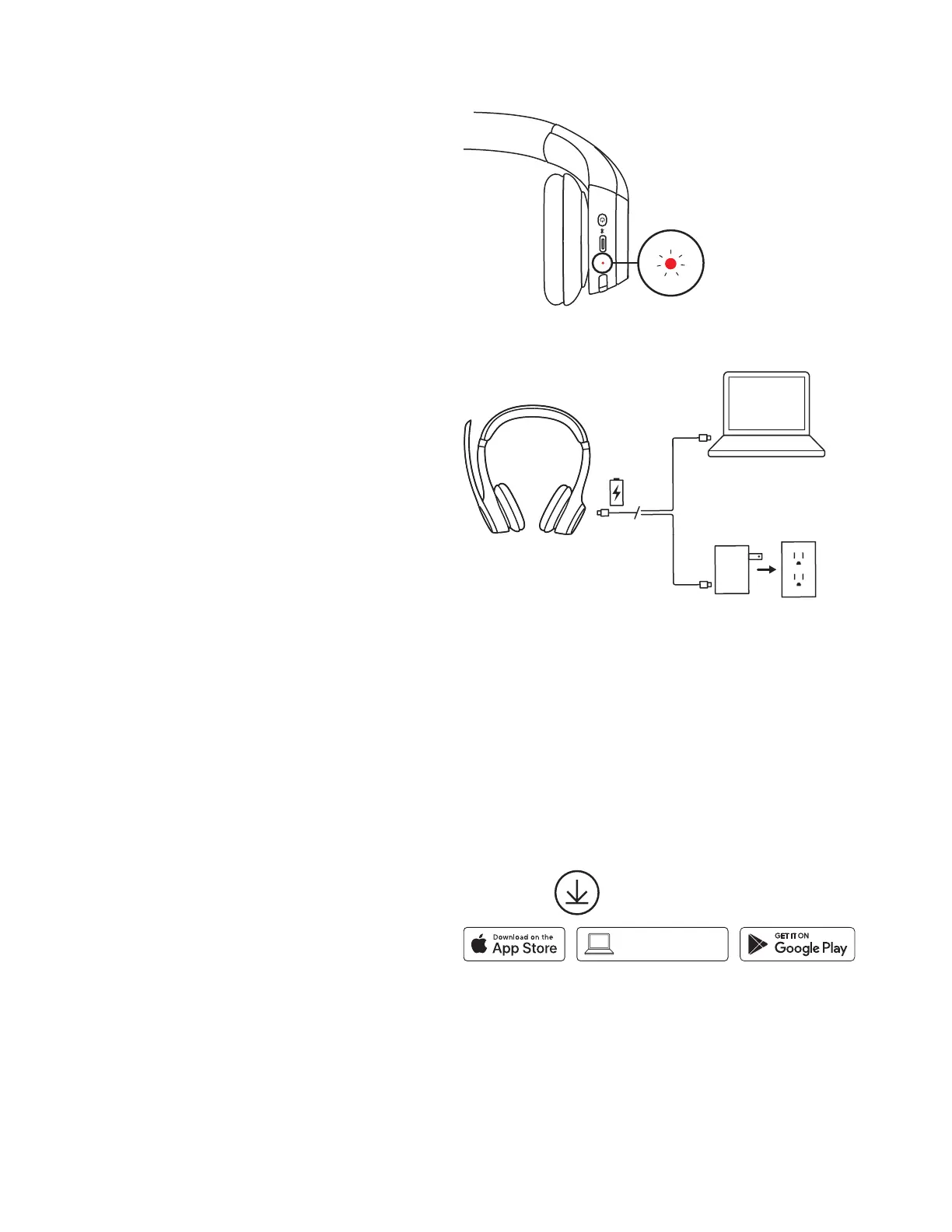
CHARGING
The LED light on the headset will become red when
the battery is lower than 10%.
1. Plug one end of the cable to the USB-C port on
the bottom of the earcup and the other end into
the USB-C charging port on your computer, dock,
or a power adapter.
2. The LED light will start breathing white
whencharging.
3. The LED light will turn solid white when fully
charged.
A 5-minute charge will give you up to 1 hour of
talk time
3
, and a full charge takes around 2 hours.
4. The headsets can be used with Bluetooth
®
paired
while charging.
USB-C
USB-C
USB-C
LOGI TUNE
Take control of your music and meeting experience
with Logi Tune. Adjust sidetone, mic level, and EQ for
your preferred audio experience using the Logi Tune
desktop or mobile app for Logitech headsets.
It is also recommended to boost your headset
performance with periodic soware and rmware
updates. Learn more and download Logi Tune
atlogitech.com/tune, the Apple App Store
orGooglePlay store.
logitech.com/tune
Logi Tune
8English








 To Next Page