Visit lomi.com/get-started for more info. Lomi Bloom Instruction Manual 1.3 - 12
EN
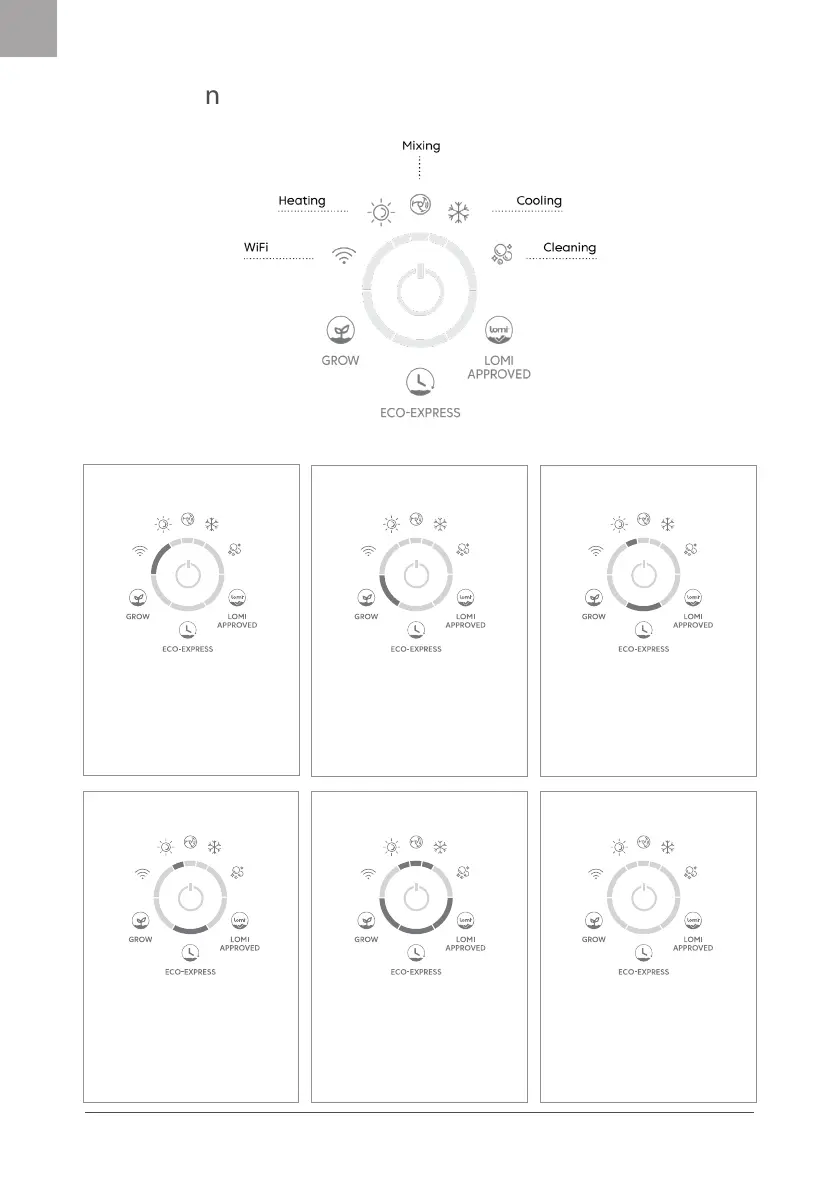
One button
functions
Cycle complete
Once the cycle is complete, all
modes & cycle phases will light up,
and Lomi will beep once. After 30
mins Lomi will return to standby
mode with all lights o to save
energy.
Change modes
Hold the button down for 2
seconds then release to switch
between modes (Grow, Eco-Ex-
press, Lomi Approved).
A light will indicate the selected
mode.
Start/Stop
Once the mode you want is
selected, press the main button to
start a cycle. The button wil light up
blue.
To stop a cycle, press the main
button for 2 seconds or open the lid.
Standby
Pause/Resume
Press the button during a cycle if
you need to pause Lomi.
The center light will ash blue for
the duration of pause.
Press again to resume a cycle.
Lomi goes to standby after 30
minutes of inactivity to save
energy. All lights are o.
To wake up, press the button once.
WiFi on/o
Press the main button 5 times to
disconnect Lomi from WiFi.
If your Lomi is not connected to
WiFi, press 5 times to initiate the
pairing process.


 To Next Page