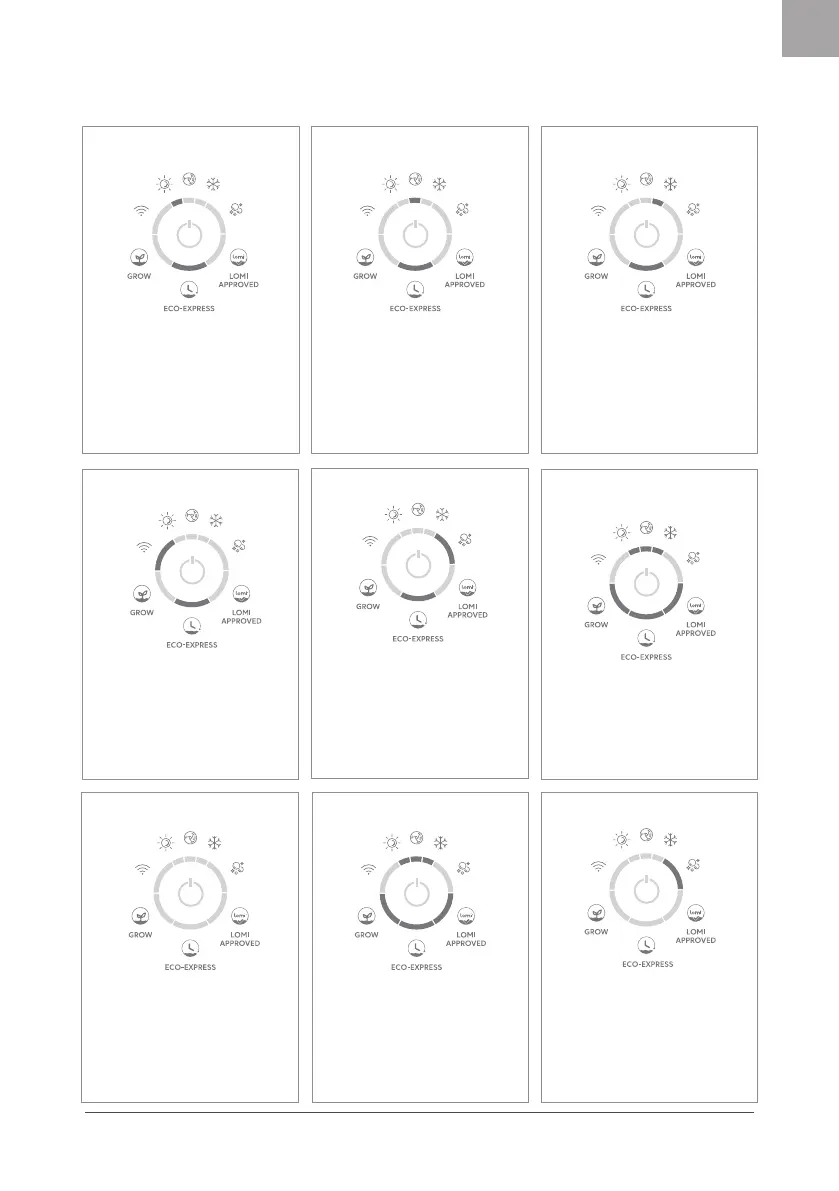
WiFi error
If a Lomi loses WiFi connection, the
WiFi light will ash blue to indicate it
is trying to reconnect. If Lomi cannot
successfully reconnect after 10
minutes, the light will ash red.
See lomi.com/lomifaq for
troubleshooting.
Ventilation error
Cycle will pause. Cooling light will
hold red and Lomi will beep. To
resolve restart Lomi.
If this does not resolve the issue, see
lomi.com/lomifaq for further
troubleshooting.
Heating error
Cycle will pause. Heating light will
turn red and Lomi will beep. To
resolve restart Lomi.
If this does not resolve the issue, see
lomi.com/lomifaq for further
troubleshooting.
Grinder jam
Grinder will automatically reverse
itself during a cycle to clear a jam.
If not xed, the cycle will stop.
Mixing light will hold red and
Lomi will beep.
See lomi.com/lomifaq for
troubleshooting.
Change lter
After about 3 months, the Cleaning
cycle light will turn red indicating
that the lters should be changed.
See detailed instructions on page 6.
After relling both lters, hold the
button for 10 seconds to clear the
light.
Opening the lid
during a cycle
When the lid is removed from the
device, the lights will ash.
Once the lid is back in place the
lights will stop ashing.
Reset
Press and hold the button for 10
seconds.
Once Lomi has reset, it will beep
and the lights will turn blue in a
clockwise sequence.
Factory reset
If a factory reset is needed, hold the
button down for 30 seconds, until all
lights ash. Note you will need to
re-pair your WiFi once factory reset is
complete.
See lomi.com/lomifaq for further
troubleshooting.
Cleaning cycle
Press the button 3 times to select
the Cleaning cycle. A light will
indicate the selected function.
Press the button 1 time to start.
Hold the button for 2 seconds to
exit out of the Cleaning cycle
selection and return to the main
modes.


 To Next Page