Visit lomi.com/get-started for more info. Lomi Bloom Instruction Manual 1.3 - 5
EN
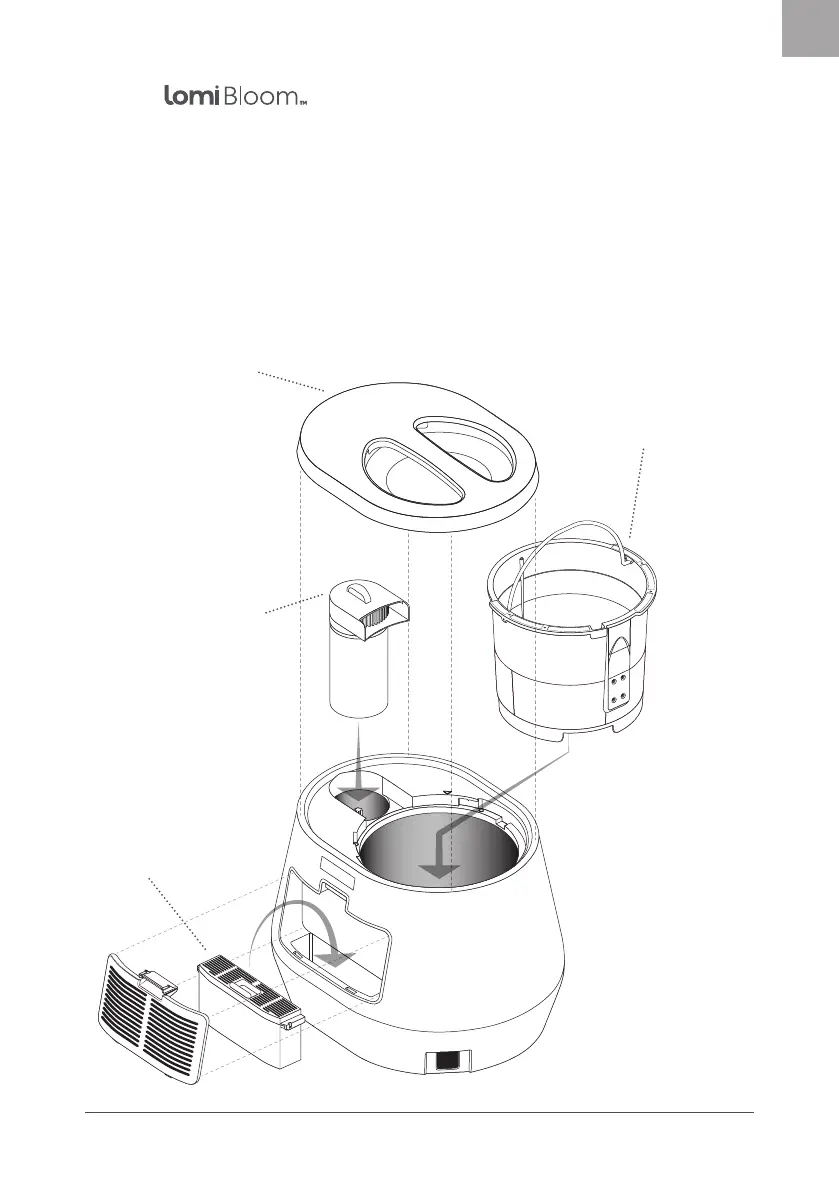
Clear lid
A clear viewing window allows
you to see the transformation
of waste into nutrient-rich Lomi
Earth! Align the arrow on the
side of the lid with the unlock
icon & twist to secure. Keep the
lid secured while Lomi is running
a cycle, and twist o when the
cycle is complete.
Remember, do not lift
Lomi by the lid handle.
WiFi connected
This smart appliance
connects to the Lomi
app using WiFi, so you
can see the status of your
Lomi cycle and track the
positive impact you’re
making on the planet.
See page 6 for set up
instructions.
Two rellable lters
Top lter
This cylindrical lter is
designed to insert easily
next to the bucket when
Lomi’s lid is removed. To
rell, remove the lter
and twist the top o.
Back lter
Sits at the back of the
unit. Push down the tab
to pull o the back lter
panel. Lift out the lter
and slide the top o it
to rell.
Removable bucket
This bucket has a built in
grinder to process your food
waste and Lomi Approved
compostables. Made from
aluminium, the bucket has
a ceramic non-stick coating,
and is dishwasher safe. Arrows
on the bucket rim align with
arrows on the interior of the
unit. To remove the bucket,
simply lift it up with the
handle, and align the arrows
to slide back in.
Meet


 To Next Page