E5
TECHNICAL
DETAILS
INTENDED USE
FACTORY
SETTINGS
TOOL USE
EXPLODED AND
PARTS LIST
OPERATION
TROUBLE
SHOOTING GUIDE
RESET
AUTO
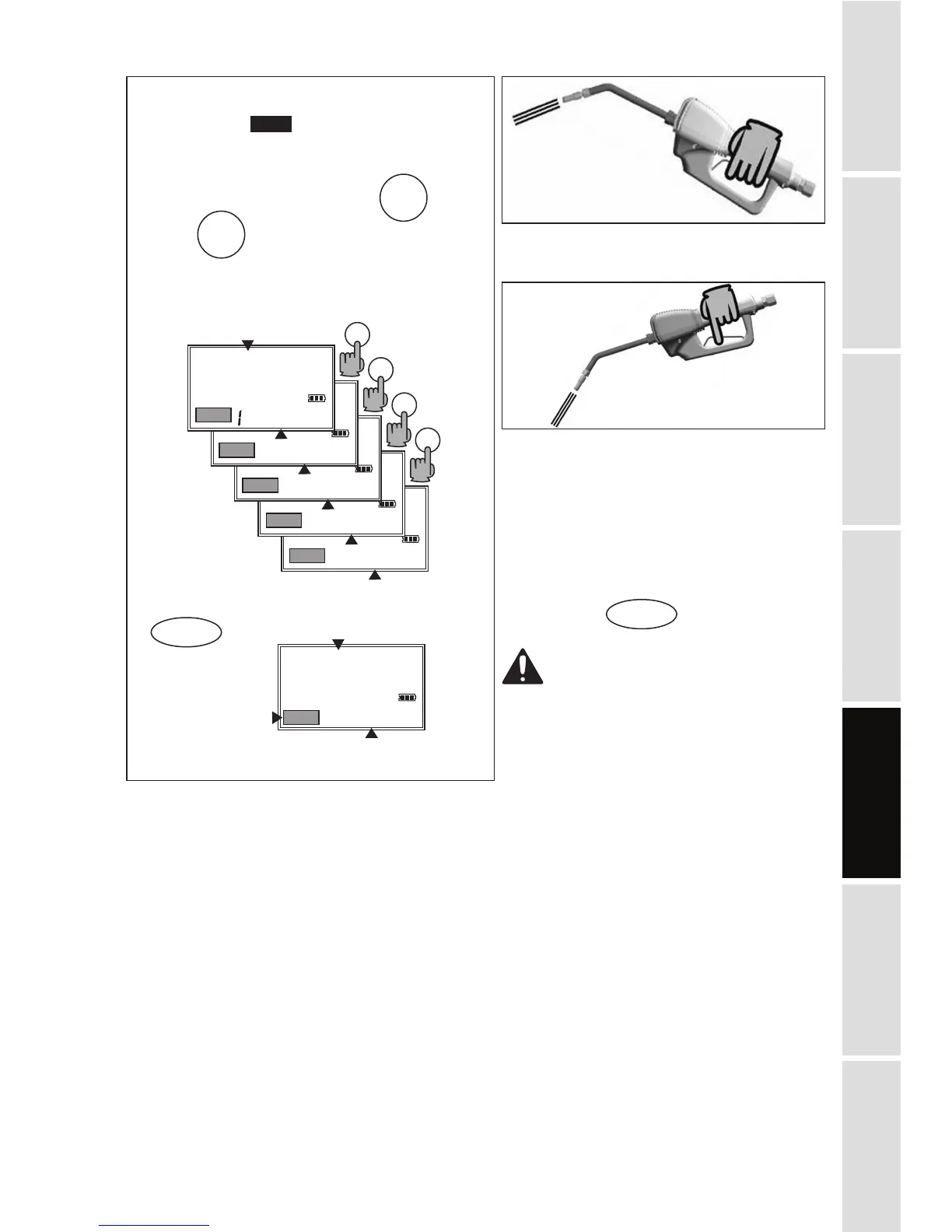
B-2. AUTO Mode
Meter stores:
1-2-3-4-last: Five different PRESET values
which are frequently used.
Start up the Meter by selecting
Press as many times as necessary to
reach the desired values and the values are
repeated.
Blinking message will be:
To confirm a PRESET value, press and hold
until the Meter displays:
AUTO message
not blinking
Reset Batch Total
AUTO
AUTO
OK/STOP
To start dispensing, pull the trigger
completely, then release.
The trigger thus remains locked in open
position. Now dispensing can continue
in AUTO mode.
Automatic stop
The flow automatically stops when the
preset value is reached.
NOTE: If you want to stop dispensing
before the preset value is reached,
just press to stop.
WARNING In all cases the
operator must attend to the Meter
while dispensing in AUTO mode
in order to avoid any oil spillage.
OK/STOP


 To Next Page