EasyManua.ls Logo

LuCell MC-020 - Passcode Management; Setting Passcode (2 User Mode); Setting Passcode (1 User Mode)

Default Icon
8 pages
Print Icon
To Next Page IconTo Next Page
To Previous Page IconTo Previous Page
Loading...
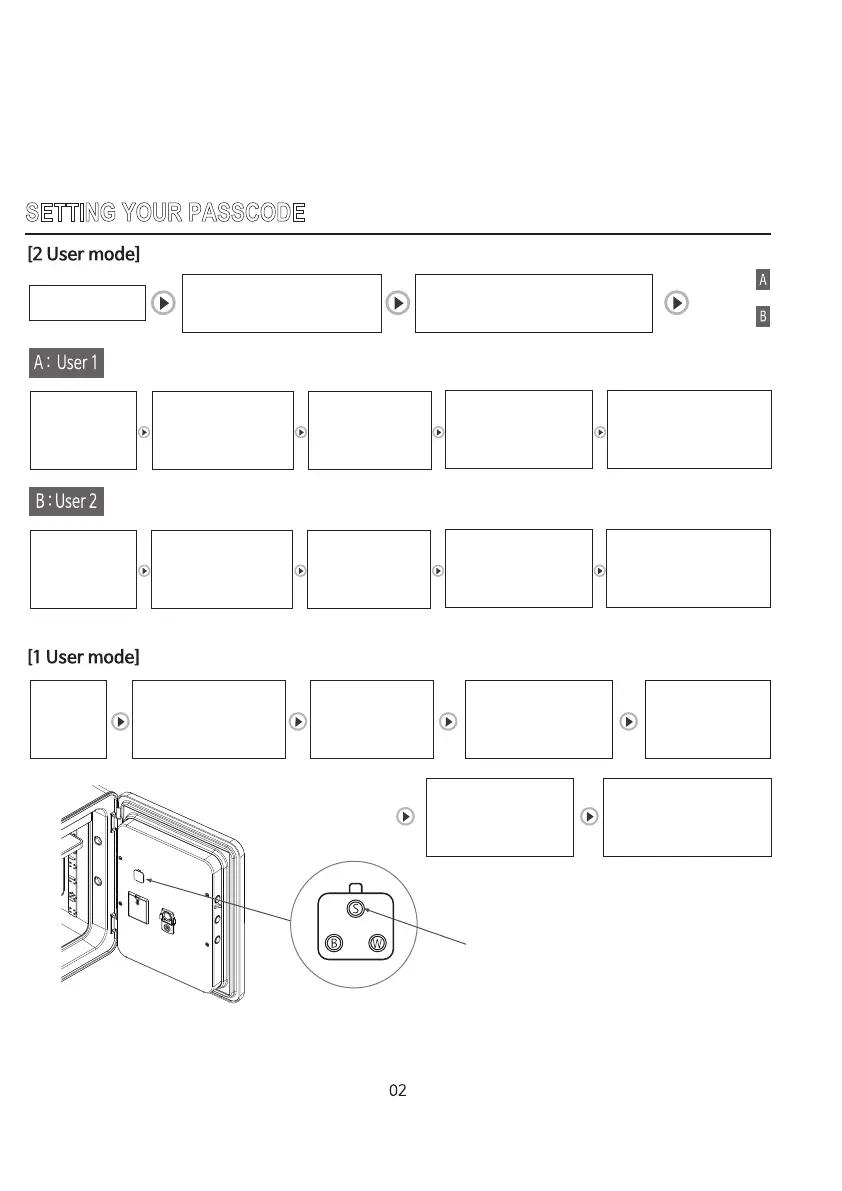
SETTING YOUR PASSCODE
Open the door
Press ‘1’,
then press
START button
Enter new passcode
(4~20 digit), Then
press START button
“AgAin”,
then ‘_____”
will be displayed.
Enter new passcode
again, then press
START button.
“USEr_1”
will be displayed.
New passcode was set.
Press ‘2’,
then press
START button
Press “S” button
on the backside of the door
“CodE” will be displayed.
And then ‘USEr_’ will be displayed.
User 1
User 2
Enter new passcode
(4~20 digit), Then
press START button
“AgAin”,
then ‘_____”
will be displayed.
Enter new passcode
again, then press
START button.
“USEr_2”
will be displayed.
New passcode was set.
Open
the door
“CodE”
will be displayed
Press “S”
button on the
backside of the door
Enter new passcode
(4~20 digit), Then
press START button
“AgAin”,
then ‘_____”
will be displayed.
Enter new passcode
again, then press
START button.
“USEr_1”
will be displayed.
New passcode was set.
“S” button