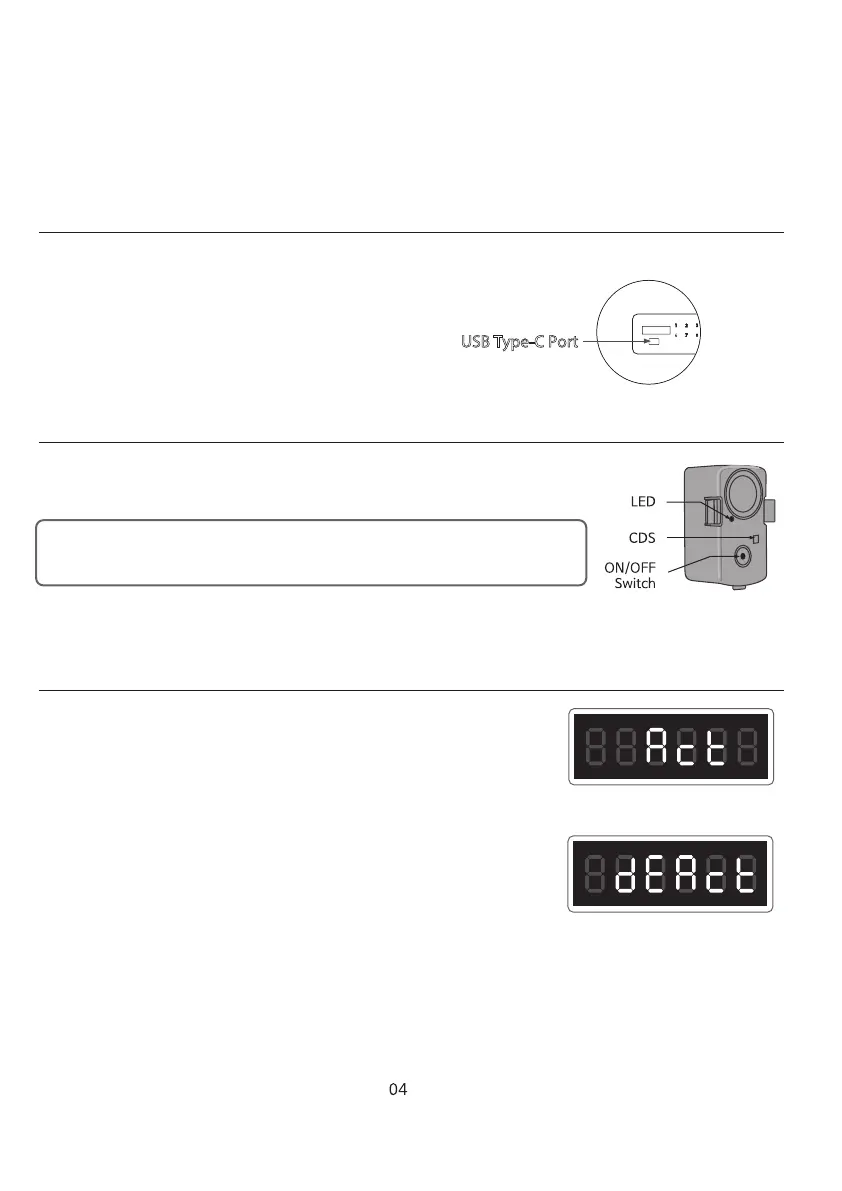
USB TYPE-C PORT
HOW TO USE ALARM
KEYPAD LOCK MODE
1. Use the “ON/OFF” switch on the alarm to control the Alarm.
2. Use 3 x 1.5V AAA Alkaline batteries.
In case the internal batteries have no more electricity, install 4 x AA Alkaline
batteries into the portable battery pack. Insert the USB Type-C cable
into the port to provide temporary power to open the door.
Replace internal 4 x AA batteries immediately.
USB Type-C Port
- When there is strong external impact or the safe is tilted, the alarm sounds (120dB).
- After 10 seconds from turning on the switch, Alarm is armed.
- There is light detecting sensor with the alarm. so it will be off when the door is open.
1. Activate
Press START for more the 10 seconds until “Act” appears.
“Act” message signifies activation of Keypad Lock mode.
Any input on the keypad will only display “Act”.
2. Deactivate
To deactivate KeypadLock mode, press START
for more than 3 seconds until “dEAct” appears.



 To Next Page