EasyManua.ls Logo

LumaPro 2LBL9 - User Manual

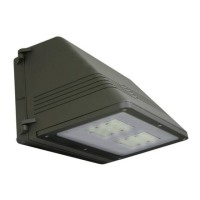
LumaPro 2LBL9
24 pages
Print Icon
To Next Page IconTo Next Page
Loading...
ENGLISH
Lighting Controls
This manual includes operating instructions for a variety of remote controlled products.
All products work on the same principle and use the same code setting information.
Please read all instructional information and note any specic information pertaining to
your particular product.
FEATURES
Products are UL/cUL and/or FCC/IC tested and approved.
Operational range of up to 100 feet.
LumaPro
®
wireless lighting controls are designed to work together. Simply determine
which transmitter(s) you would like to have control which receiver(s) and set the
code setting to match.
WARNINGS:
FOR USE ONLY with 120 volt incandescent or halogen bulbs.
DO NOT USE with uorescent bulbs, appliances, power supplies, low voltage
lighting, or any other electrical devices.
This manual applies to the following
products:
Wireless Transmitters (Indoor / Outdoor)
180° Motion Sensor (2)
Receivers
Halogen Security Light
Floodlight
PAGE REFERENCE GUIDE
Page 3
2LBN1
Page 5
2LBL9
Page 7
598-1326-01
LPG-6028, LPG-6042
®
Operating Instructions & Parts Manual 2LBL9, 2LBN1
HEA 007
Printed in China
12/07
Please read and save these instructions. Read carefully before attempting to assemble, install, operate or maintain the product
described. Protect yourself and others by observing all safety information. Failure to comply could result in personal injury and/or
property damage! Save these instructions for future reference.

Questions and Answers

  • J
    Joseph TorresAug 9, 2025
    Why does my LumaPro 2LBL9 Outdoor Light come on randomly?
    • M
      Mario MartinezAug 10, 2025
      If your LumaPro Outdoor Light comes on randomly, it could be due to a short-term power line failure. The next transmission from the transmitter should reset the receiver to the correct state. Alternatively, another transmitter operating on the same frequency might be the cause. In this case, try changing the codes on the transmitter and receiver units.
  • L
    lucaschristinaAug 18, 2025
    What to do if LumaPro 2LBL9 does not turn off?
    • K
      Kayla WalkerAug 18, 2025
      If your LumaPro Outdoor Light does not turn off, the solution might be the same as if the signals from the transmitter are being blocked, or the transmitter is out of range, so check for metal objects that could block the signal, or reposition the transmitter. Also, check the battery charge and replace it if necessary. Finally, verify code settings on transmitter and receiver units are set the same.
  • M
    murillochristopherOct 29, 2025
    What to do if LumaPro 2LBL9 Outdoor Light does not come on?
    • R
      Robin LawrenceOct 29, 2025
      If your LumaPro Outdoor Light doesn't turn on, there are several potential causes: * The circuit breaker or fuse might be off, so verify that it is turned on. * The switch on the device itself could be off; ensure it's on. * Another device might be causing interference. Try changing the codes on both the transmitter and receiver units. * If it's a remote motion sensor, allow 90 seconds for initialization after installation. * The transmitter's signals may be blocked or out of range. Check for obstructions or reposition the transmitter. * A weak battery in the transmitter can prevent operation. Check the battery charge and replace it if needed. * Mismatched dip switches on the transmitter and receiver units can cause issues. Ensure the code settings are the same on both. * ...

Summary

Luma Pro Lighting Controls Overview

Safety Warnings

Important safety precautions for using the lighting controls, including voltage and bulb type limitations.

Product Features

Key features of the LumaPro wireless lighting controls, such as UL/cUL/FCC/IC approval and operational range.

Code Configuration

Setting Codes and Groups

Explains how to set transmitter and receiver codes and groups for system operation.

Switch Locations

Illustrates the location of code and mode switches on different device types.

180° Motion Sensor Operation

Setting Detection Mode

Configure the motion sensor for day/night or night-only detection.

Battery Installation

Guide for properly installing batteries in the motion sensor.

Mounting Instructions

Detailed steps for installing the motion sensor and its mounting bracket.

Motion Sensor Adjustments

Operation and Adjustment Guide

Steps to check operation, adjust sensor aiming, range, and ON-TIME settings.

Receiver and Halogen Light Installation

Receiver Features

General features and ratings applicable to all receivers in the system.

Halogen Light Installation

Detailed steps for wiring and mounting the Halogen Security Light fixture.

Halogen Light Lamp Modes

Describes the three selectable lamp modes: NORMAL, SOFT, and FLASH.

Halogen Light Bulb Installation

Bulb Installation Procedure

Step-by-step guide for installing halogen bulbs into the fixture, including handling precautions.

Safety Precautions

Critical safety advice regarding heat, clearances, and bulb type for halogen fixtures.

Floodlight (2 LBL9) Installation

Floodlight Features

Details on the Floodlight's wattage, lamp type, and wiring requirements.

Floodlight Lamp Modes

Explains the three selectable lamp modes: NORMAL, SOFT, and FLASH.

Floodlight Wiring and Mounting

Step-by-step instructions for wiring and mounting the Floodlight fixture.

Troubleshooting and Warranty

Troubleshooting Common Issues

Identifies common symptoms like device not coming on or turning off randomly, with solutions.

Regulatory Information

Details FCC and Industry Canada compliance statements for the device.

Warranty Information

Outlines the one-year limited warranty terms for the product.

LumaPro 2LBL9 Specifications

General IconGeneral
Voltage120V
Color Temperature3000K
IP RatingIP65
Lifespan50000 hours
MaterialAluminum
Input Voltage120V