English -
14
Chapter 5 Setting Menu Description
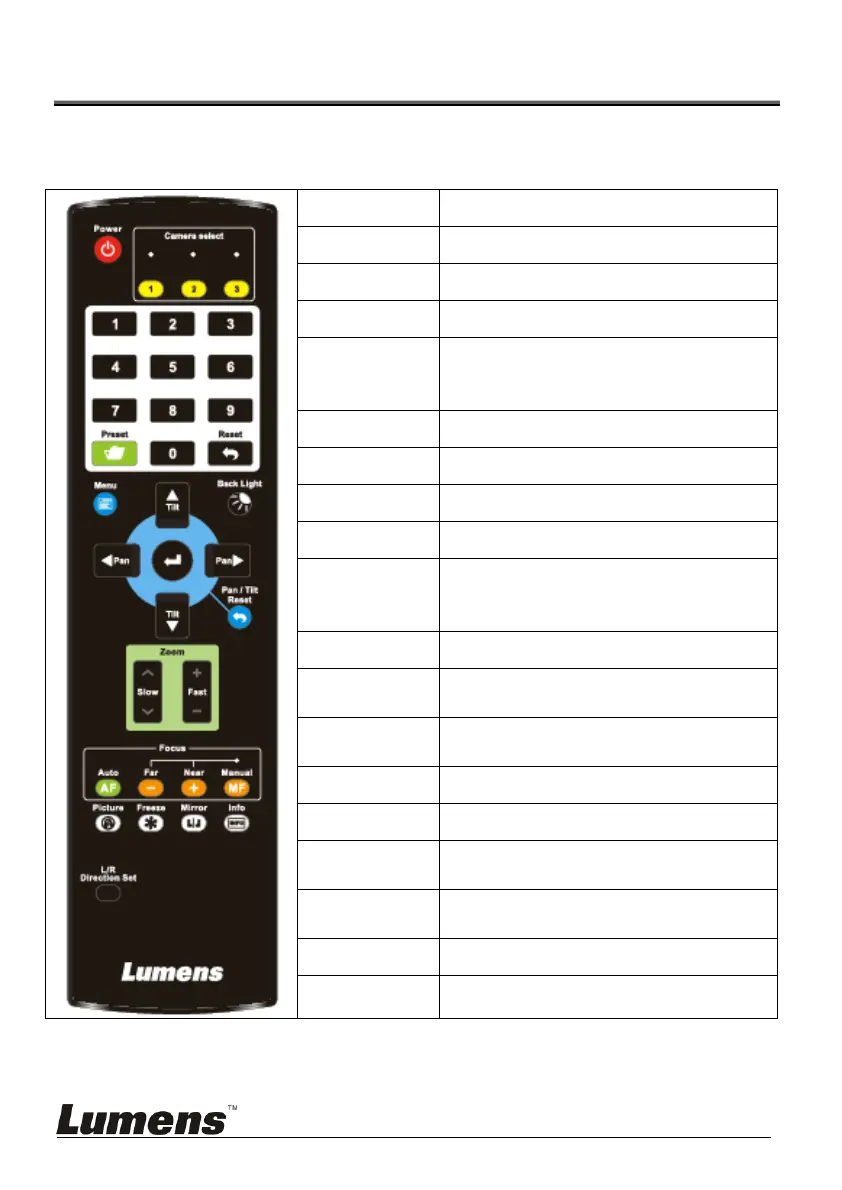
5.1 Functions of remote control
<Remark>The below functions are listed alphabetically.
Item Description
,,,
Move the lens
Back Light Turn on/off back light compensation
Camera select
NA
Focus-
Manual /
Far/Near
Turn on manual focus to adjust the
focal length
Focus-Auto Auto focus
Freeze NA
Home-Enter Go back to the main page / Execute
Info NA
L/R
Direction Set
L/R Direction / Normal
Menu NA
Mirror
Rotate the image (OFF / Mirror /
Flip / Ratate)
Pan/Tilt
Reset
Clear the Pan / Tilt setting
Picture NA
Power Power Switch
Preset
Appoint an ID (0 ~ 9) to save the
current position data
Reset
Appoint an ID (0 ~ 9) to delete the
current position data
Zoom-Fast Adjust image size
Zoom-Slow Fine-tune image size



 To Next Page
 Loading...