General information
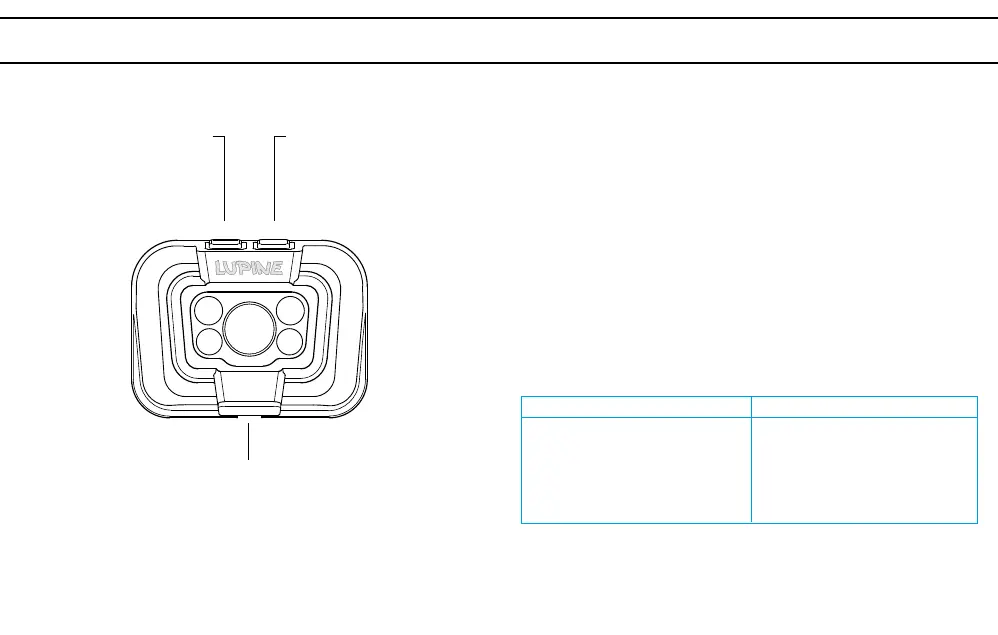
Button to operate
the white LEDs
Button to operate
the red LEDs
Charge by USB C
Operation
Turn on
The first press of the button switches on the light.
Switching
Each quick push of the button switches through the light settings.
0.35 W Diffuse + Spot + Main
1 W Diffuse + Spot + Main
3 W Diffuse + Spot + Main
6 W Diffuse + Spot + Main
0.35 W Diffuse + Spot
0.8 W Diffuse + Spot
1.6 W Diffuse + Spot
3 W Diffuse + Spot
Turn off
To turn off the lamp, keep button pressed.
Light settings
Red LEDs
White LEDs
Key lock
By pressing both buttons at the same time for abour 3sec., key lock is
activated. To confirm that, one red LED will light up once. Same procedure
to deactivate key lock, it will be confirmed by a single white LED lighting
up once.



 To Next Page