EasyManua.ls Logo

LUX TX100Ea - System Configuration and Setup Options; Gas;Electric and B;O Circuit Board Options; Front Panel Controls Overview; System Configuration Menu

LUX TX100Ea
8 pages
Print Icon
To Next Page IconTo Next Page
To Previous Page IconTo Previous Page
Loading...
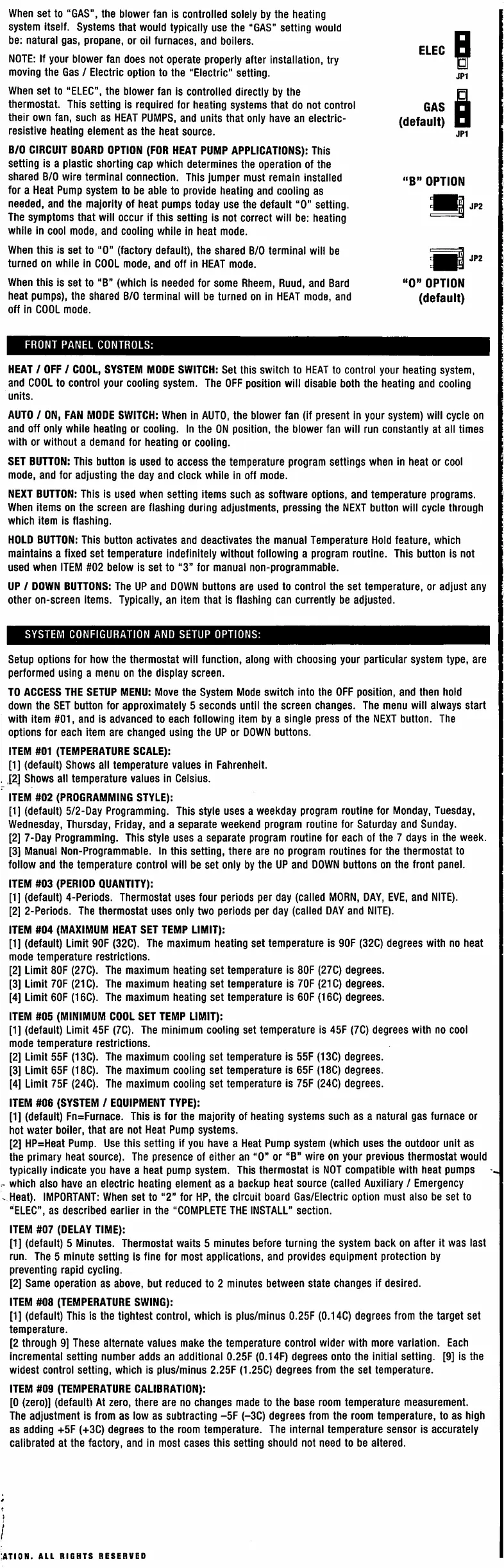
When
set
to
“GAS”,
the
blower
fan
is
controlled
solely
by
the
heating
system
itself.
Systems
that
would
typically
use
the
“GAS”
setting
would
be:
natural
gas,
propane,
or
oil
furnaces,
and
boilers.
NOTE:
If
your
blower
fan
does
not
operate
properly
after
installation,
try
moving
the
Gas
/
Electric
option
to
the
"Electric"
setting.
When
set
to
“ELEC”,
the
blower
fan
is
controlled
directly
by
the
thermostat.
This
setting
is
required
for
heating
systems
that
do
not
control
their
own
fan,
such
as
HEAT
PUMPS,
and
units
that
only
have
an
electric-
resistive
heating
element
as
the
heat
source.
B/0
CIRCUIT
BOARD
OPTION
(FOR
HEAT
PUMP
APPLICATIONS):
This
setting
is
a
plastic
shorting
cap
which
determines
the
operation
of
the
shared
B/0
wire
terminal
connection.
This
jumper
must
remain
installed
for
a
Heat
Pump
system
to
be
able
to
provide
heating
and
cooling
as
needed,
and
the
majority
of
heat
pumps
today
use
the
default
“0”
setting.
The
symptoms
that
will
occur
if
this
setting
is
not
correct
will
be:
heating
while
in
cool
mode,
and
cooling
while
in
heat
mode.
When
this
is
set
to
“0"
(factory
default),
the
shared
B/0
terminal
will
be
turned
on
while
in
COOL
mode,
and
off
in
HEAT
mode.
When
this
is
set
to
“B”
(which
is
needed
for
some
Rheem,
Ruud,
and
Bard
heat
pumps),
the
shared
B/0
terminal
will
be
turned
on
in
HEAT
mode,
and
off
in
COOL
mode.
I
ELEC
JP1
I
GAS
(default)
JP1
B”
OPTION
JP2
JP2
0”
OPTION
(default)
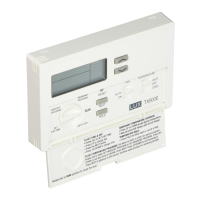
FRONT
PANEL
CONTROLS:
HEAT
/
OFF
/
COOL,
SYSTEM
MODE
SWITCH:
Set
this
switch
to
HEAT
to
control
your
heating
system,
and
COOL
to
control
your
cooling
system.
The
OFF
position
will
disable
both
the
heating
and
cooling
units.
AUTO
/
ON,
FAN
MODE
SWITCH:
When
in
AUTO,
the
blower
fan
(If
present
in
your
system)
will
cycle
on
and
off
only
while
heating
or
cooling.
In
the
ON
position,
the
blower
fan
will
run
constantly
at
all
times
with
or
without
a
demand
for
heating
or
cooling.
SET
BUTTON:
This
button
is
used
to
access
the
temperature
program
settings
when
in
heat
or
cool
mode,
and
for
adjusting
the
day
and
clock
while
in
off
mode.
NEXT
BUTTON:
This
is
used
when
setting
items
such
as
software
options,
and
temperature
programs.
When
items
on
the
screen
are
flashing
during
adjustments,
pressing
the
NEXT
button
will
cycle
through
which
item
is
flashing.
HOLD
BUTTON:
This
button
activates
and
deactivates
the
manual
Temperature
Hold
feature,
which
maintains
a
fixed
set
temperature
indefinitely
without
following
a
program
routine.
This
button
is
not
used
when
ITEM
#02
below
is
set
to
“3”
for
manual
non-programmab
le.
UP
/
DOWN
BUTTONS:
The
UP
and
DOWN
buttons
are
used
to
control
the
set
temperature,
or
adjust
any
other
on-screen
items.
Typicaliy,
an
item
that
is
flashing
can
currently
be
adjusted.
SYSTEM
CONFIGURATION
AND
SETUP
OPTIONS:
Setup
options
for
how
the
thermostat
will
function,
along
with
choosing
your
particular
system
type,
are
performed
using
a
menu
on
the
display
screen.
TO
ACCESS
THE
SETUP
MENU:
Move
the
System
Mode
switch
into
the
OFF
position,
and
then
hoid
down
the
SET
button
for
approximately
5
seconds
until
the
screen
changes.
The
menu
will
always
start
with
item
#01,
and
is
advanced
to
each
following
item
by
a
single
press
of
the
NEXT
button.
The
options
for
each
item
are
changed
using
the
UP
or
DOWN
buttons.
ITEM
#01
(TEMPERATURE
SCALE):
[1]
(default)
Shows
all
temperature
values
in
Fahrenheit.
.
.[2]
Shows
all
temperature
values
in
Celsius.
ITEM
#02
(PROGRAMMING
STYLE):
[1]
(default)
5/2-Day
Programming.
This
style
uses
a
weekday
program
routine
for
Monday,
Tuesday,
Wednesday,
Thursday,
Friday,
and
a
separate
weekend
program
routine
for
Saturday
and
Sunday.
[2]
7-Day
Programming.
This
style
uses
a
separate
program
routine
for
each
of
the
7
days
in
the
week.
[3]
Manual
Non-Programmable.
In
this
setting,
there
are
no
program
routines
for
the
thermostat
to
follow
and
the
temperature
control
will
be
set
only
by
the
UP
and
DOWN
buttons
on
the
front
panel.
ITEM
#03
(PERIOD
QUANTITY):
[1]
(default)
4-Periods.
Thermostat
uses
four
periods
per
day
(called
MORN,
DAY,
EVE,
and
NITE).
[2]
2-Periods.
The
thermostat
uses
only
two
periods
per
day
(called
DAY
and
NITE).
ITEM
#04
(MAXIMUM
HEAT SET
TEMP
LIMIT):
[1]
(default)
Limit
90F
(32C).
The
maximum
heating
set
temperature
is
90F
(32C)
degrees
with
no
heat
mode
temperature
restrictions.
[2]
Limit
80F
(27C).
The
maximum
heating
set
temperature
is
80F
(27C)
degrees.
[3]
Limit
70F
(21C).
The
maximum
heating
set
temperature
is
70F
(21C)
degrees.
[4]
Limit
60F
(16C).
The
maximum
heating
set
temperature
is
60F
(16C)
degrees.
ITEM
#05
(MINIMUM
COOL
SET
TEMP
LIMIT):
[1]
(default)
Limit
45F
(7C).
The
minimum
cooling
set
temperature
is
45F
(7C)
degrees
with
no
cool
mode
temperature
restrictions.
[2]
Limit
55F
(13C).
The
maximum
cooling
set
temperature
is
55F
(13C)
degrees.
[3]
Limit
65F
(18C).
The
maximum
cooling
set
temperature
is
65F
(18C)
degrees.
[4]
Limit
75F
(24C).
The
maximum
cooling
set
temperature
is
75F
(24C)
degrees.
ITEM
#06
(SYSTEM
/
EQUIPMENT
TYPE):
[1]
(default)
Fn=Furnace.
This
is
for
the
majority
of
heating
systems
such
as
a
natural
gas
furnace
or
hot
water
boiler,
that
are
not
Heat
Pump
systems.
[2]
HP=Heat
Pump.
Use
this
setting
if
you
have
a
Heat
Pump
system
(which
uses
the
outdoor
unit
as
the
primary
heat
source).
The
presence
of
either
an
“0”
or
“B”
wire
on
your
previous
thermostat
would
typically
indicate
you
have
a
heat
pump
system.
This
thermostat
is
NOT
compatible
with
heat
pumps
r-
which
also
have
an
electric
heating
element
as
a
backup
heat
source
(called
Auxiliary
/
Emergency
^
Heat).
IMPORTANT:
When
set
to
“2"
for
HP,
the
circuit
board
Gas/Electric
option
must
also
be
set
to
“ELEC”,
as
described
earlier
in
the
“COMPLETE
THE
INSTALL”
section.
ITEM
#07
(DELAY
TIME):
[1]
(default)
5
Minutes.
Thermostat
waits
5
minutes
before
turning
the
system
back
on
after
it
was
last
run.
The
5
minute
setting
is
fine
for
most
applications,
and
provides
equipment
protection
by
preventing
rapid
cycling.
[2]
Same
operation
as
above,
but
reduced
to
2
minutes
between
state
changes
if
desired.
ITEM
#08
(TEMPERATURE
SWING):
[1]
(default)
This
is
the
tightest
control,
which
is
plus/minus
0.25F
(0.14C)
degrees
from
the
target
set
temperature.
[2
through
9]
These
alternate
values
make
the
temperature
control
wider
with
more
variation.
Each
incremental
setting
number
adds
an
additional
0.25F
(0.14F)
degrees
onto
the
initial
setting.
[9]
is
the
widest
control
setting,
which
is
plus/minus
2.25F
(1.25C)
degrees
from
the
set
temperature.
ITEM
#09
(TEMPERATURE
CALIBRATION):
[0
(zero)]
(default)
At
zero,
there
are
no
changes
made
to
the
base
room
temperature
measurement.
The
adjustment
is
from
as
low
as
subtracting
-5F
(-3C)
degrees
from
the
room
temperature,
to
as
high
as
adding
+5F
(+3C)
degrees
to
the
room
temperature.
The
internal
temperature
sensor
is
accurately
calibrated
at
the
factory,
and
in
most
cases
this
setting
should
not
need
to
be
altered.
I
I
;ation.
all
rights
reserved

Related product manuals