EasyManua.ls Logo

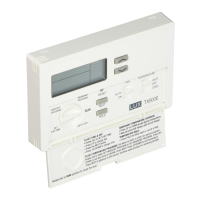
LUX TX100Ea - Basic Operations and Programming; Set Day and Time; Keypad Lockout Feature; Temperature Programming Guide

LUX TX100Ea
8 pages
Print Icon
To Next Page IconTo Next Page
To Previous Page IconTo Previous Page
Loading...
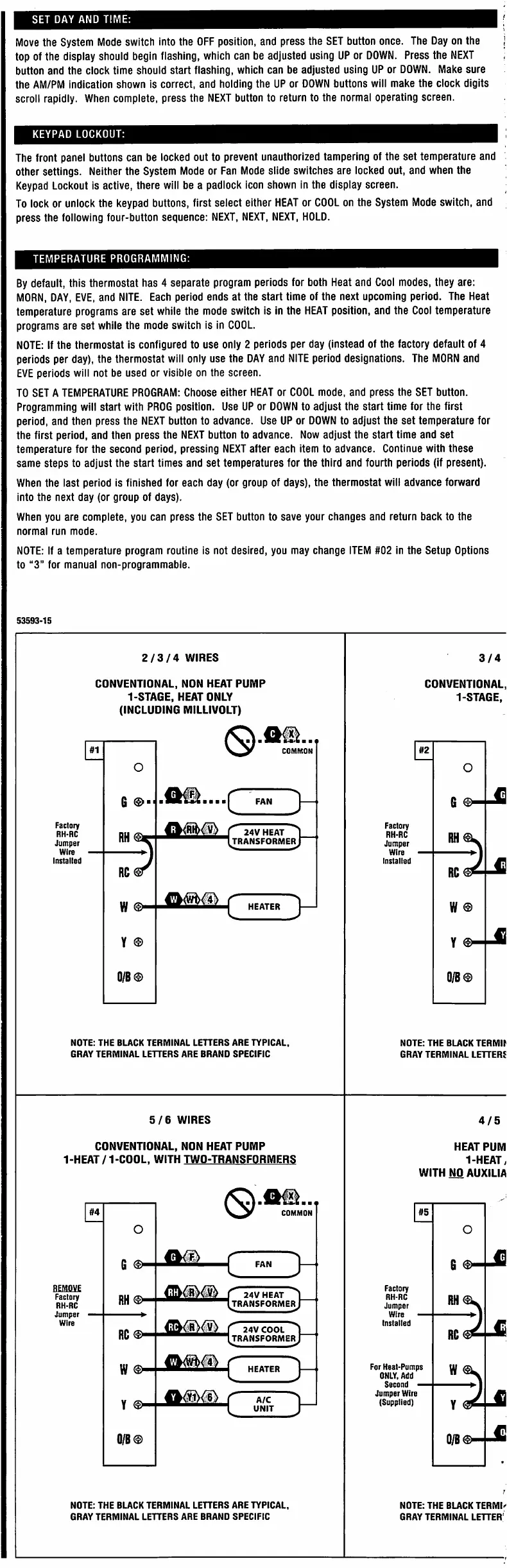
SET
DAY
AND
TIME:
I
Move
the
System
Mode
switch
into
the
OFF
position,
and
press
the
SET
button
once.
The
Day
on
the
top
of
the
display
should
begin
fiashing,
which
can
be
adjusted
using
UP
or
DOWN.
Press
the
NEXT
button
and
the
clock
time
should
start
flashing,
which
can
be
adjusted
using
UP
or
DOWN.
Make
sure
the
AM/PM
indication
shown
is
correct,
and
holding
the
UP
or
DOWN
buttons
wiii
make
the
clock
digits
scroil
rapidly.
When
complete,
press
the
NEXT
button
to
return
to
the
normal
operating
screen.
KEYPAD
LOCKOUT:
The
front
panel
buttons
can
be
locked
out
to
prevent
unauthorized
tampering
of
the
set
temperature
and
other
settings.
Neither
the
System
Mode
or
Fan
Mode
slide
switches
are
locked
out,
and
when
the
Keypad
Lockout
is
active,
there
will
be
a
padlock
icon
shown
in
the
display
screen.
To
lock
or
unlock
the
keypad
buttons,
first
select
either
HEAT
or
COOL
on
the
System
Mode
switch,
and
press
the
following
four-button
sequence:
NEXT,
NEXT,
NEXT,
HOLD.
TEMPERATURE
PROGRAMMING:
By
default,
this
thermostat
has
4
separate
program
periods
for
both
Heat
and
Cool
modes,
they
are:
MORN,
DAY,
EVE,
and
NITE.
Each
period
ends
at
the
start
time
of
the
next
upcoming
period.
The
Heat
temperature
programs
are
set
while
the
mode
switch
is
in
the
HEAT
position,
and
the
Cool
temperature
programs
are
set
while
the
mode
switch
is
in
COOL.
NOTE:
If
the
thermostat
is
configured
to
use
only
2
periods
per
day
(instead
of
the
factory
default
of
4
periods
per
day),
the
thermostat
will
only
use
the
DAY
and
NITE
period
designations.
The
MORN
and
EVE
periods
will
not
be
used
or
visible
on
the
screen.
TO
SET
A
TEMPERATURE
PROGRAM:
Choose
either
HEAT
or
COOL
mode,
and
press
the
SET
button.
Programming
will
start
with
PROG
position.
Use
UP
or
DOWN
to
adjust
the
start
time
for
the
first
period,
and
then
press
the
NEXT
button
to
advance.
Use
UP
or
DOWN
to
adjust
the
set
temperature
for
the
first
period,
and
then
press
the
NEXT
button
to
advance.
Now
adjust
the
start
time
and
set
temperature
for
the
second
period,
pressing
NEXT
after
each
item
to
advance.
Continue
with
these
same
steps
to
adjust
the
start
times
and
set
temperatures
for
the
third
and
fourth
periods
(if
present).
When
the
last
period
is
finished
for
each
day
(or
group
of
days),
the
thermostat
will
advance
forward
into
the
next
day
(or
group
of
days).
When
you
are
complete,
you
can
press
the
SET
button
to
save
your
changes
and
return
back
to
the
normal
run
mode.
NOTE:
If
a
temperature
program
routine
is
not
desired,
you
may
change
ITEM
#02
in
the
Setup
Options
to
“3”
for
manual
non-programmable.
53593-15
2/3/4
WIRES
3/4
CONVENTIONAL,
NON
HEAT
PUMP
1-STAGE.
HEAT
ONLY
(INCLUOING
MILLIVOLT)
CONVENTIONAL,
1-STAGE.
m
#1
#2
COMMON
O
o
G
-^3
●c
G
©■
FAN
Factory
RH-RC
Jumper
Factory
RH-RC
Jumper
Wire
Installed
'
24V
HEAT
transformerJ
Wire
Installed
RC
RC
C
w
©
w
®
HEATER
Y
0/B©
0/B®
NOTE:
THE
BLACK
TERMINAL
LETTERS
ARE
TYPICAL,
GRAY
TERMINAL
LETTERS
ARE
BRAND
SPECIFIC
NOTE:
THE
BLACK
TERMIt
GRAY
TERMINAL
LETTERS
5/6
WIRES
4/5
CONVENTIONAL,
NON
HEAT
PUMP
1-HEAT/1-COOL,
WITH
TWO-TRANSFORMERS
HEAT
PUM
1-HEAT>
WITHNOAUXILIA
fx]
#4
#5
COMMON
O
o
(
m
G
G
FAN
mm
Factory
RH-RC
Jumper
Factory
RH-RC
Jumper
"
24V
HEAT
transformerJ
RH
Wire
Wire
Installed
"
24V
COOL
transformerJ
RC®>
RC
>
c
For
Heat-Pumps
ONLY.
Add
Second
Jumper
Wire
(Supplied)
w
w
HEATER
}
A/C
Y
Y
UNIT
Q/B®
NOTE:
THE
BUCK
TERMINAL
LETTERS
ARE
TYPICAL,
GRAY
TERMINAL
LETTERS
ARE
BRAND
SPECIFIC
NOTE:
THE
BUCK
TERMI^
GRAY
TERMINAL
LETTER'

Related product manuals