35
Product Details
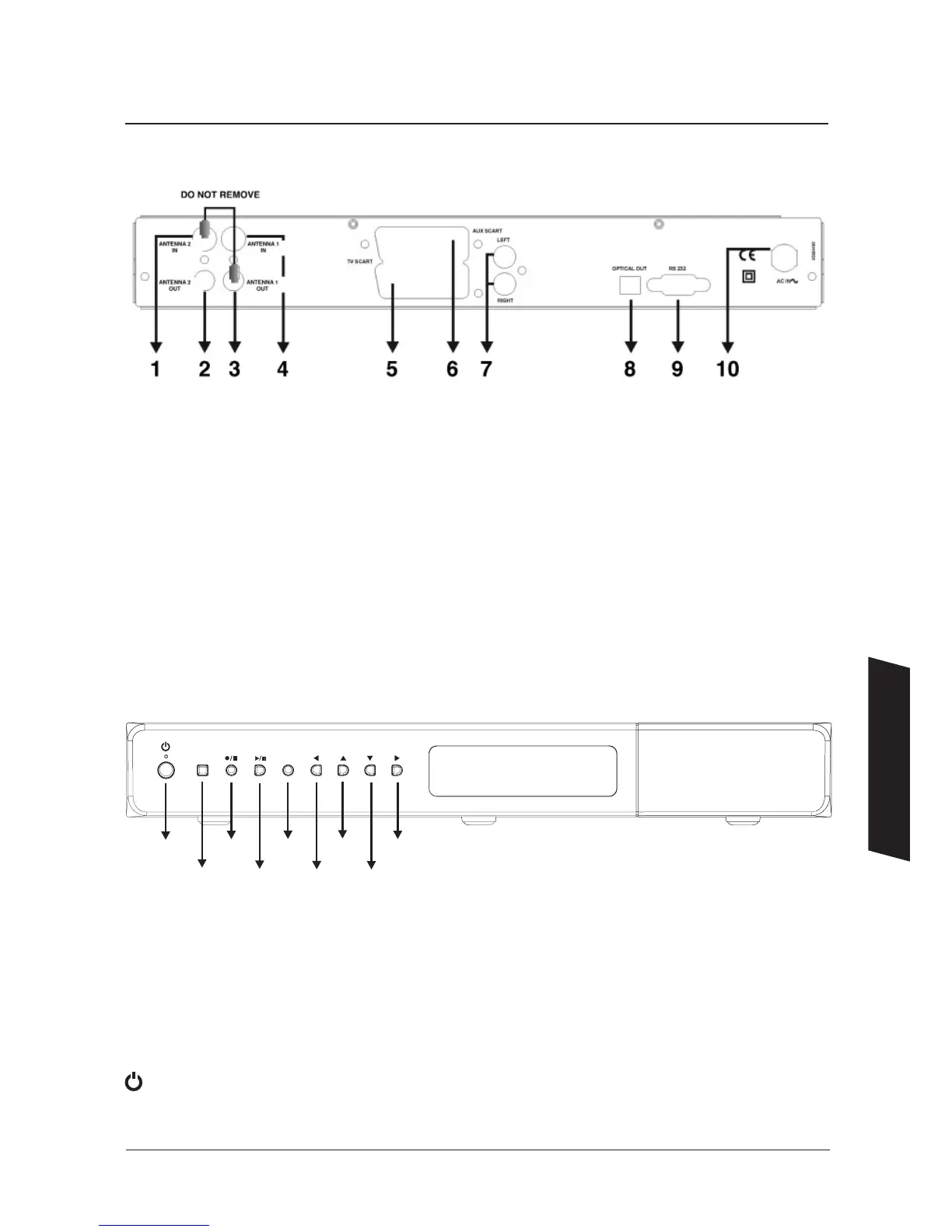
Rear panel connections
Front panel indicators and buttons
Front Panel Display
Power Status – GREEN On
Power Status – RED Standby
Remote Control Activity – RED Key Symbol
Software Upgrade – OAD displayed
Recording – RED
Front Panel Buttons
– On/Standby button
1. AERIAL 2 IN : Loop through
2. AERIAL 2 OUT : To watch analogue channels on the TV
3. AERIAL 1 OUT : Loop through
4. AERIAL 1 IN : Aerial input
5. TV SCART : TV SCART connection
6. AUX SCART : Output for other equipment such as DVD, VCR etc.
7. ANALOGUE AUDIO LEFT/RIGHT : Analogue audio output
8. OPTICAL AUDIO : Optical digital audio output
9. RS232 : Software upgrade
10. POWER SUPPLY : 220-240V AC, 50Hz
Information


 To Next Page