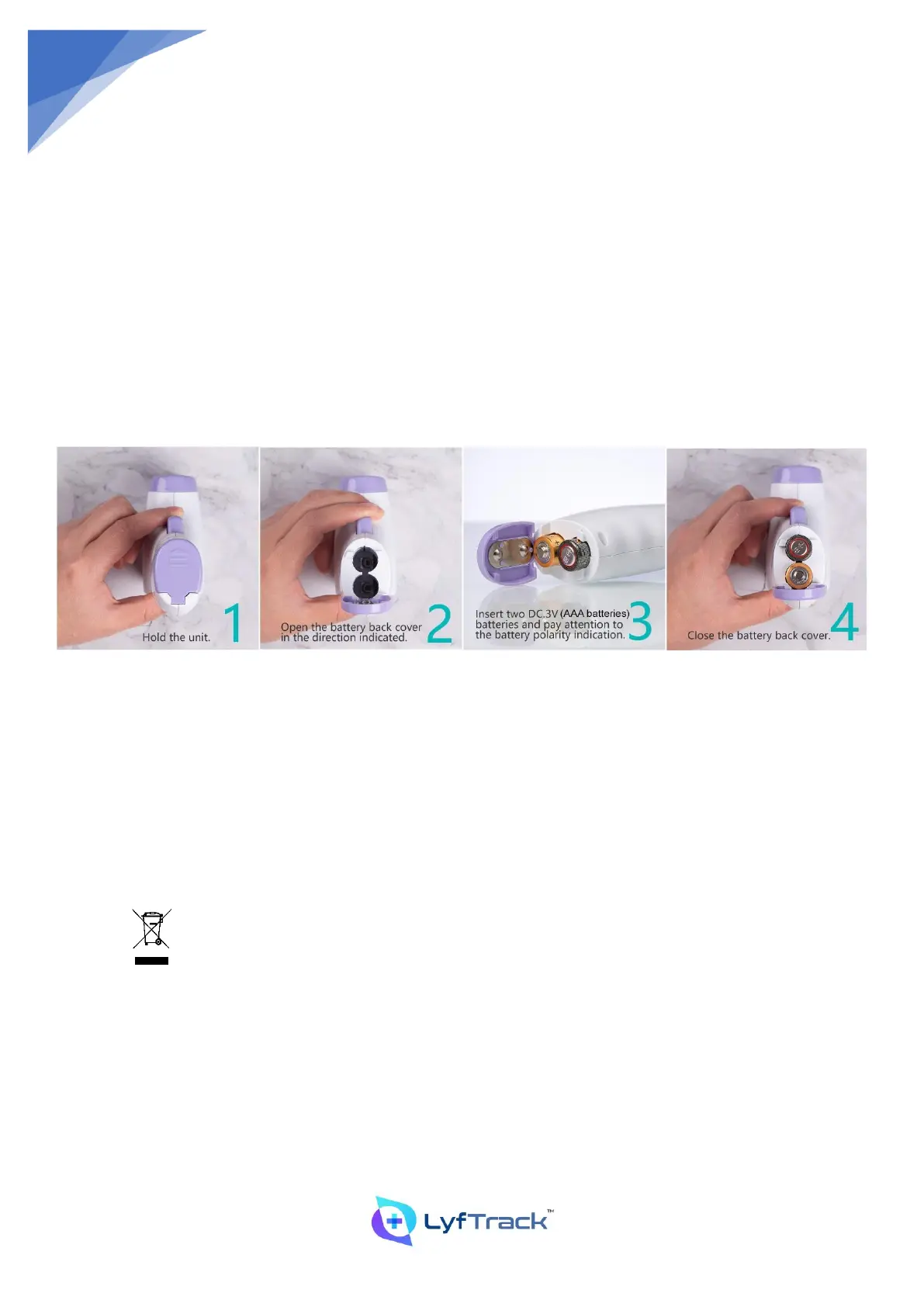
6.1 How to Install Batteries
The machine requires two DC3V (AAA batteries). When the low voltage icon flashes on the screen, the battery needs to
be replaced.
Remove the battery back cover in the direction indicated (Step 1)
Replace the battery, and correctly reprint the battery according to the positive and negative poles marked (Step 2)
1. Hold the unit and open the battery back cover in the direction indicated.
2. Insert two DC3V (AAA batteries) batteries and pay attention to the battery polarity indication.
Battery Replacement Cycle for Consumables and Description of The Replacement Method
The removable parts of this product mainly include batteries, before installing accessories, please make sure that the
accessories specifications and models are consistent with the original factory regulations, please be sure to use the
company's specified model accessories, if necessary, please contact the seller or manufacturer's contact telephone
number.
Battery installation and replacement: When the display appears low voltage prompt symbol, please replace the special
battery. For installation and replacement, please refer to the Instructions for Installation and Use in this manual.
Batteries and electronic equipment shall be disposed of in accordance with applicable local
laws and regulations and shall not be casually thrown into the garbage to avoid irreversible
pollution.


 To Next Page