Setting the honey extractor’s rotations
Semi-automatic controller HES-02 has a possibility to
change the direction of basket operation, i.e. “only to the
right” or “to the left and to the right”
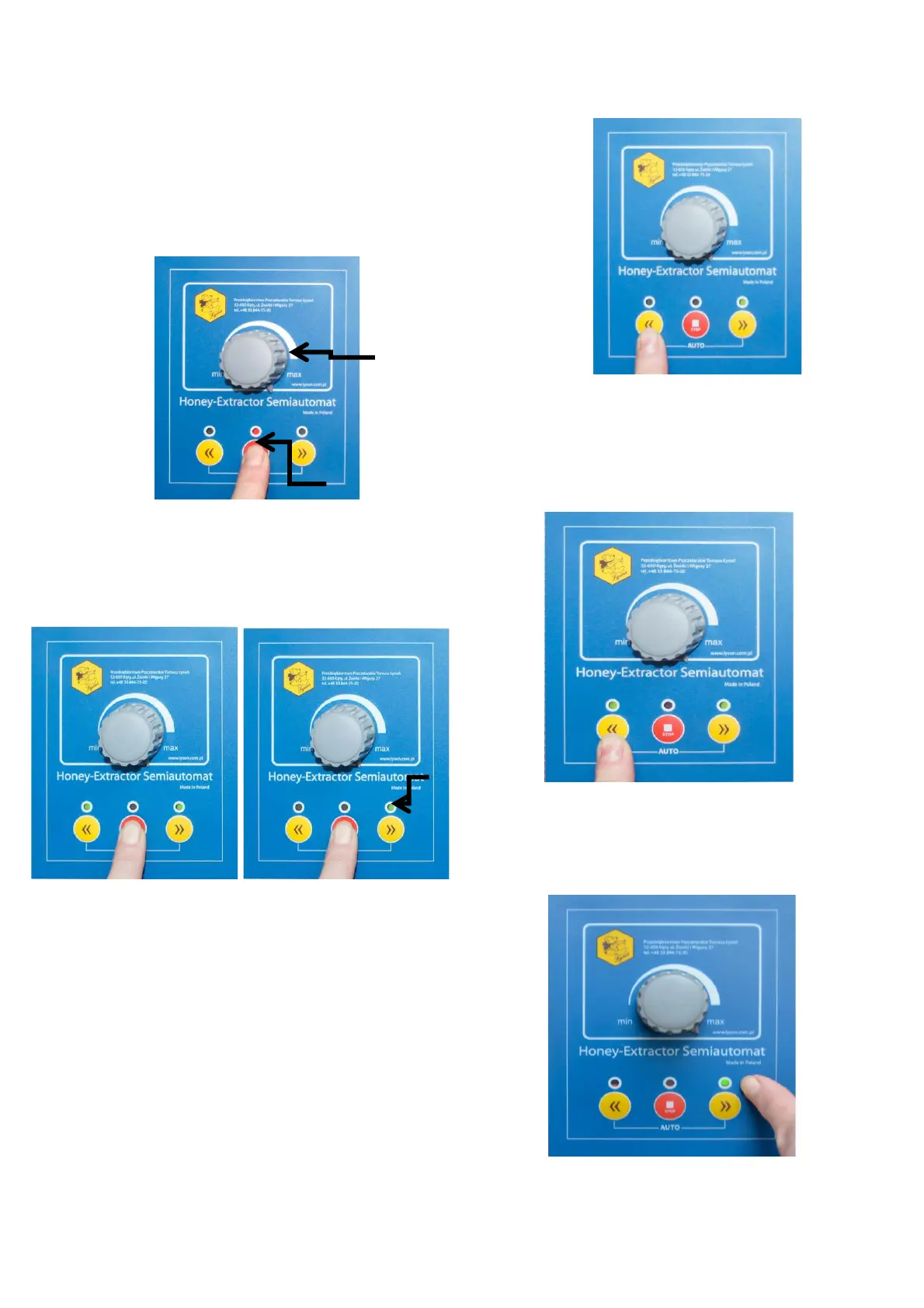
1. Turn the knob to position max. (Photo.1).
Photo 1.
2. Activate the controller with “0/1” switch. When the diodes
start to flash, press and hold STOP button (Photo 1) until
the right diode lights up or both green diodes light up
(Photo 2)
Photo 2. Cassette mode (A) and radial mode (B)
3. In order to change the rotation direction, press button
„arrow to the left” until the green diode signalling the
demanded configuration lights up:
– Green diode to the right lit up: radial honey extractor
mode: rotations to the right only
(Photo 3)
Photo 3. Radial mode (only right rotations)
– Both green diodes lit up (from the left and right
sides), cassette honey extractor mode: rotations to
the right and left (Photo 4)
Photo 4. Cassette mode (left and right rotations)
4. In order to confirm the selection of the rotation
mode, press the button „arrow to the right”.
(Photo 5)
Photo 5. Confirmation of the rotation type


 To Next Page