EasyManua.ls Logo

M3 Mobile US20X - Basic Device Operations; Device Layout, Keys, and Home Screen

M3 Mobile US20X
45 pages
Print Icon
To Next Page IconTo Next Page
To Previous Page IconTo Previous Page
Loading...
US20 Series
User Manual
17
2 Basic Use
2.1 Features
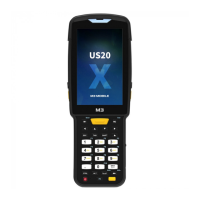
Device Layout
① Receiver
② Charging LED
③ Sensor
④ Ear jack
⑤ Screen
⑥ Scanner Button
⑦ C-type USB
⑧ Microphone
⑨ Power Button
⑩ Function Button
⑪ Charging Contacts
⑫ Scanner
⑬ Rear Camera
⑭ Speaker
⑮ Battery Lock Button
⑯ Battery
2.2 Key
2.2.1 Button
Button
Description
Scanner Operate scanner while executing scanner program.
Function Execute the work set to the button.
Power Power on/off screen or shut off power

Related product manuals

M3 Mobile US20X - Basic Device Operations; Device Layout, Keys, and Home Screen