20
HANDS-FREE SPEAKING
• Press the accept-call button to take a call.
Music playback will be automatically interrupted.
• Briefly press this button again to end the call.
Playback will be continued. Press and hold this
button to transfer the call to your smartphone.
• Press and hold the button to reject a call.
IMPORTANT: Not all phones support playback control
and phone answer/end control. Check your phone’s user
manual for more information if you’re having trouble with
these functions.
USING THE AUX IN INPUT
Use the 3.5mm audio cable to connect the audio
output from your device to the AUX IN audio input
on the speaker’s side panel.
The speaker automatically switches to the AUX IN
audio.
To listen to Bluetooth audio again, unplug the
cable from the speaker’s AUX IN jack.
INTEGRATED POWER BANK
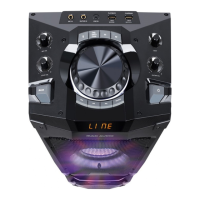
You can use the loudspeaker’s charging output
DC 5V OUT (8) to charge your smartphone or other
devices that can be charged via USB. Use a USB
cable to connect the device to be charged with the
loudspeaker.
The loudspeaker’s charge will be reduced
accordingly.



 To Next Page