1 689 989 285 2020-02-24| Robert Bosch GmbH
4.5.3 Functions of LEDs A and B
Status LED A LED B
ET650 ready for
operation
Does not
illuminate
Flashes green
(1 second interval)
Data communication
with the controller
Flashes green
(irregular)
Flashes green
(1 second interval)
Firmware update
in operation
Does not
illuminate
Flashes red
(irregular)
LED A Function Measures
Does not
illuminate
No data
communication with
the controller
Check connection
with the controller
Flashes green
(irregular)
Data communication
with the controller
None
Illuminated green Fault in hardware/
Firmware
*)
Illuminated red Power supply
> 35 Volt.
Check voltage in
vehicle
LED B Function Measures
Does not
illuminate
Voltage not present Check power
supply
Flashes green
(1 second
interval)
ET650 ready for
operation
None
Illuminated green Fault in hardware/
Firmware
*)
Flashes yellow
(1 second
interval)
Overvoltage on
diagnostic cable
*)
Illuminated
yellow
Fault in hardware/
Firmware
*)
Flashes red
(irregular)
Firmware update
in operation
None
Illuminated red Fault in firmware-
update
Repeat firmware
update
*)
Unplug the USB connection and power supply and connect
them again. If the error still exists, contact customer service.
12 | ET750 | Product descriptionen
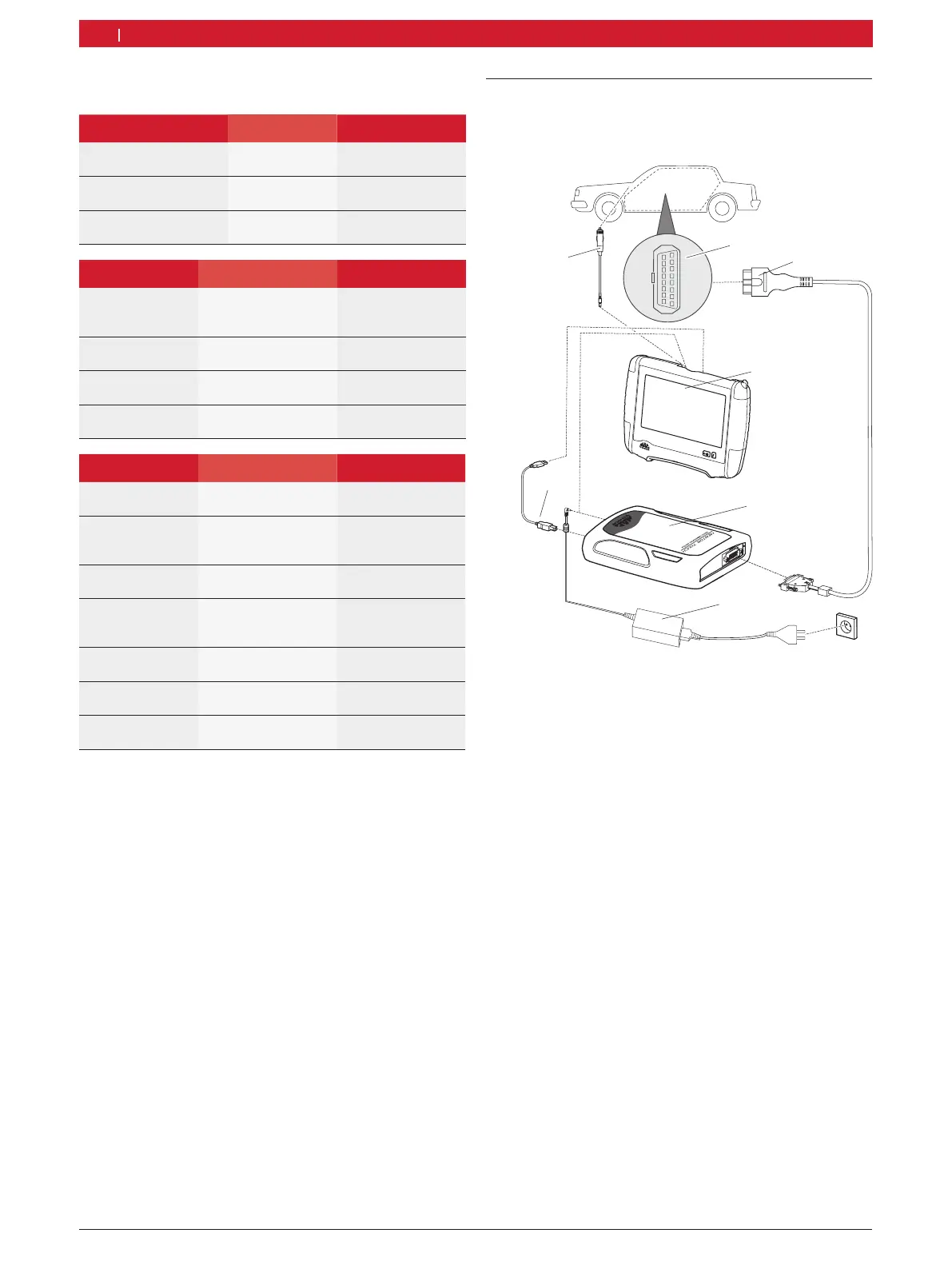
4.6 Connection diagram
The ET650 can be connected to the ET750 via
Bluetooth or the USB interface.
1
2
3
4
5
6
7
8
9
10
11
12
13
14
15
16
459966-05_Re
1
2
3
4
5
6
7
oben/top
®
Fig. 6: ET650 connection diagram
1 OBD interface in motor vehicle
2 OBD connection cable
3 ET750
4 ET650
5 Power supply unit
6 USB connecting cable
7 Connection cable for cigarette lighter socket



 To Next Page