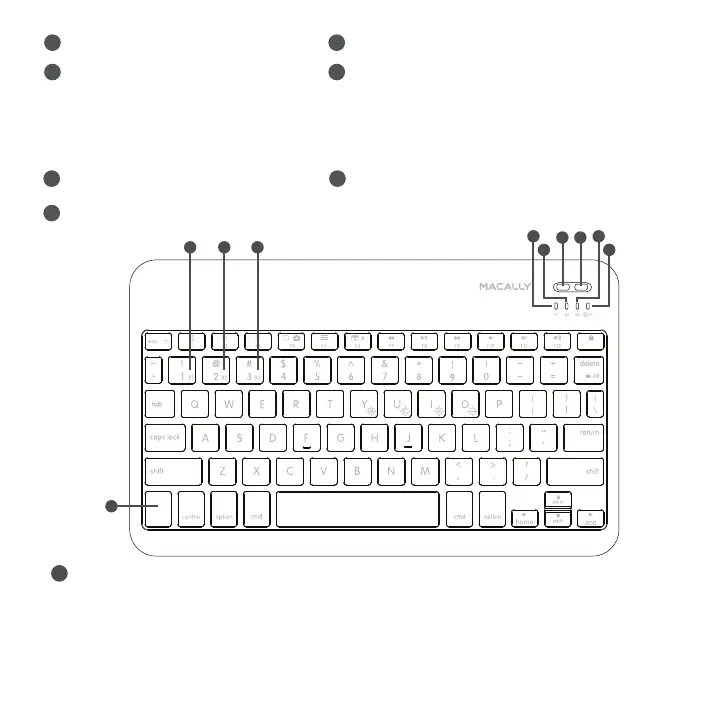
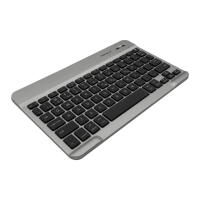
1. Press fn with one of Bluetooth device keys, B1, B2 and B3 to select a Bluetooth device to use the keyboard
2. Press fn key with dual-function key to perform F1 to F12, PrtScn, del, enter, home, end, pgup, pgdn, and 4
backlight control keys.
Use of fn(Fn) key: Select Bluetooth device, and use Function keys etc.
8
5
4
Bluetooth device 1 indicator: blue
Bluetooth device 2 indicator: blue
Bluetooth Device 3 indicator: blue
Please note: LED will show purple color when both blue and red light are on simultaneously; when the battery level is low,
B1, B2 and B3 blue LEDs will blink simultaneously once every 5 seconds to remind you to charge the keyboard
using the USB cable.
Pair button
1 2
Caps lock indicator: blue
Charging indicator: red during charging,
and off when full
4
Bluetooth device keys: B1,B2 and B3, pressed
with Fn key simultaneously to select a Bluetooth
device channel
6
3
5
On/Off slide switch, turn on first
to use the keyboard
7
1
2
3
PrtScn
Pair Off-On
enter
win winalt alt
fn
7
8
4
6 6 6


 To Next Page