3. Each motor on the axis will move to it's end position.
4. The axis will wait for all motors to be done and then report homed.
All axes must know which direction to travel in order to find their home position, the speed at which to travel at, the
offset from the marker to call their home position, and the order in which all axes home. Axes can also be homed
individually if needed.
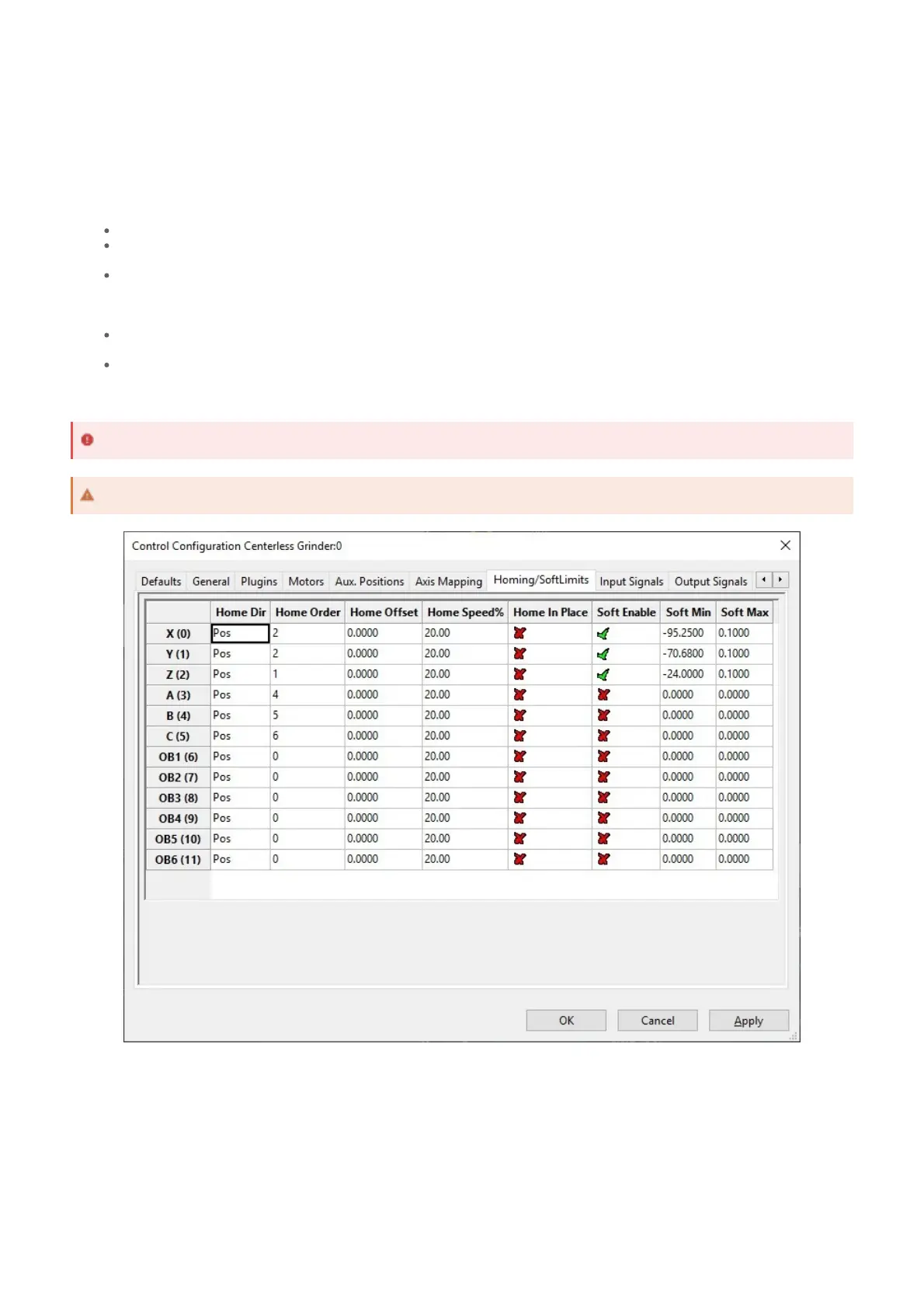
1. On the menu bar, click Configure -> Control, then select the Homing / SoftLimits tab.
2. For each enabled axis, enter the following information:
Home Dir: the direction of travel the axis must move to find it's home condition (eg. home switch)
Home Order: the order in which axes should home when all axes are homing together. This is used for
managing potential interferences, particularly with Z axes.
Home Offset: the distance between the home condition (eg. home switch) and the desired home
position. This allows the home switch to be outside normal travel of the axis and the home position to be
inside normal travel of the axis. The axis does not move this distance without a separate parameter
being set elsewhere.
Home Speed %: the percentage of max velocity for the axis to travel towards it's home condition. The
axis must be moving sufficiently slowly to not overtravel past it's home switch.
Home In Place: Unselect for all axes. This is not a supported option on RapidPath.
3. Press Apply to save any changes and OK to close the configuration window.
The motor specifics of the homing operation are configured in the RapidPath configuration window. When choosing
homing options for slaved or gantry motors, use caution when configuring the homing sequence that the motors do not
pull the axis out of shape.
The homing methods below detail how a motor will find it's home condition. The homing method is configured in the
RapidPath configuration window.
1. On the menu bar, click Configure -> Plugins -> RapidPath, then select the Drives tab.
General Homing Setup
Regarding Home Speed %, the axis must be sufficiently slow to not overtravel past it's home switch.
The Home In Place option is not supported on RapidPath.
Selecting Homing Method
Homing Method Options


 To Next Page