MAINSTREAM COMPLETE LIVE STREAMING & VIDEO CAPTURE INTERFACE WITH PROGRAMMABLE CONTROL KEYS
3
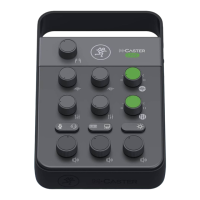
Mic Level Control Knob (+Sig/OL LED)
This knob is used to adjust the channel volume – microphone and headset – to the headphones and mix minus.
It ranges from:
XLR/TRS input – (o) to maximum gain (+60 dBu)
/8" TRRS headset input – (o) to maximum gain (+50 dBu)
The accompanying dual-colored LED will illuminate green when the channel (mic / headset) signal is present,
indicating signal. It will remain lit so long as there is signal above –20 dBu present in that channel.
This dual-colored LED will illuminate red when the channel (mic / headset) signal is too high, indicating
a signal overload. This should be avoided, as distortion will occur. If the OL LED comes on regularly, check that the volume
knob is set correctly for the mic / headset. The signal is at –3 dB before hard clip begins.
The LED is measured post-level knob, but pre-output level knob.
Aux Mute Button
Mute switches do just what they sound like they do. They turn o the signal by “routing” it into oblivion. Pressing this button
mutes the channel 2 (/8" aux) input. Engaging the aux mute button (almost) provides the same results as turning the device’s
volume all the way down.
Mute buttons illuminate red when engaged.
Mic Mute Button
Mute switches do just what they sound like they do. They turn o the signal by “routing” it into oblivion. Pressing this button
mutes the channel (mic / headset) input. Engaging the mic mute button (almost) provides the same results as turning
the mic level control knob all the way down.
Mute buttons illuminate red when engaged (as seen to the lef).
Headphone Level Control Knob
This knob is used to adjust the volume at the /4" headphones and /8" headset outputs from (o)
to maximum gain (max). Make sure that this knob is fully o before selecting or adding a new source.
WARNING: The headphone amp is loud and can cause permanent hearing damage.
Even intermediate levels may be painfully loud with some headphones. BE CAREFUL!
Always turn the phones level control all the way down before connecting headphones,
or doing anything new that may aect the headphone volume. Then turn it up slowly
as you listen carefully.



 To Next Page