MAINSTREAM COMPLETE LIVE STREAMING & VIDEO CAPTURE INTERFACE WITH PROGRAMMABLE CONTROL KEYS
6
Things to Remember
• Never listen to loud music for prolonged periods.
Please see the Safety Instructions on page 2 for information on hearing protection.
• Save the shipping boxes and packing materials! You may need them someday. Besides, the cats will love playing
in them and jumping out at you unexpectedly. Remember to pretend like you are surprised!
• Save your sales receipt in a safe place.
About This Guide
This guide is designed to be accessible, with subsections as complete as practical to minimize having to electronically leaf
back and forth looking for the whole story. The entire manual does not need to be read to figure out how to use MainStream.
As the saying goes, “a picture tells a 000 words”. With that thought in mind, we added quite a few illustrations, screenshots
and other images throughout to accompany the text.
This icon marks information that is critically important or unique! For your own good, read and remember
them.
There’s an illustration of a microscope, so, of course, you’re going to get more detailed information
when you see this little guy. There are explanations of features and practical tips listed here.
It’s a good idea to pay attention to text displayed next to a note icon, as this icon draws attention
to certain features and functions relating to the usage of MainStream.
Getting Started
The following steps will help you set up MainStream quickly. If you desire a more thorough walk-through of MainStream,
there is a wealth of information in the following pages!
. Make all initial connections with the power switches OFF on all equipment.
Make sure the volume controls are all the way down.
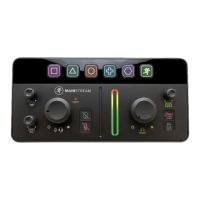
2. Plug signal sources into the MainStream, such as:
• A microphone and a set of headphones/monitors or a headset. [Add 48V phantom power, if necessary].
• A phone connected to the /8" aux jack via TRRS.
• A video device plugged into the HDMI input jack.[Computer, video game console, DSLR camera, etc.]
• A webcam, USB mic, flash drive, etc. connected to the USB-C IN jacks.
3. Connect one end of the included USB-C cable to the MainStream USB-C OUT jack and plug the other end into a computer.
It will power up automatically when the computer is turned on.
4. Power up all devices connected to MainStream.
5. Confirm that all mute switches are o.
6. Open the application of your choice and map the multifunction keys as desired.
7. Slowly raise the input and output volumes to a comfortable listening level.
8. Start streaming!





 To Next Page