3. Press the up or down button on the remote control to select a file, then press
ENTER to play the file.
4. Press the
to move to the next file.
Or press the
to move to the previous file.
5. Press the < button to go to the previous folder or to page up, or press the >
button to page down.
To repeat a file or folder of an MP3 disc:
During MP3 playback, press the REPEAT button to cycle through the available
settings:
Repeat single---Repeats the current file.
Repeat All---Repeats the contents of current folder.
Repeat off---Turns off repeat and resumes normal playback.
This icon in front of an item indicates it’s a folder.
This icon in front of an item indicates it’s an MP3 file.
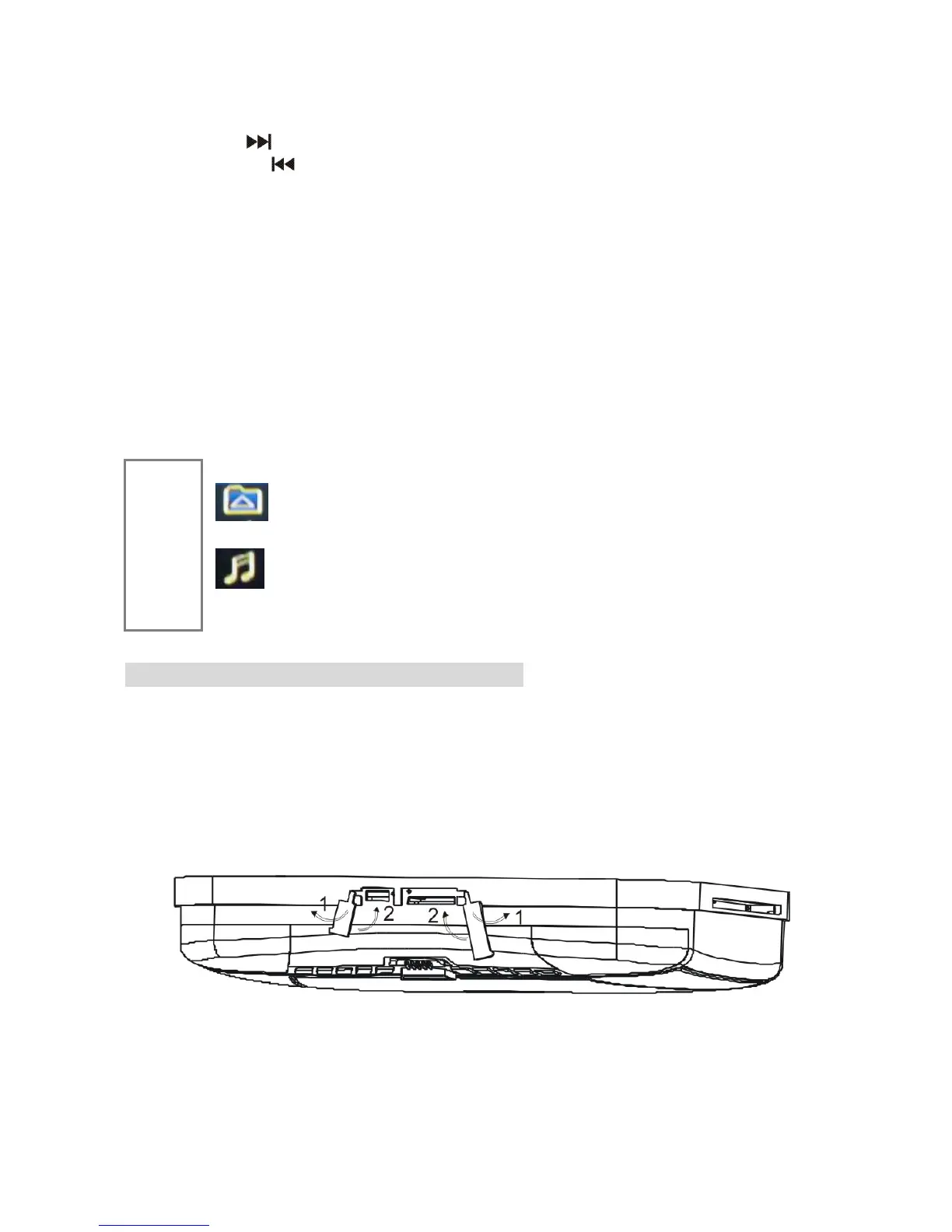
Using the USB storage and memory card
1. Following the arrow 1 to open the rubber cover which fixing in the unit when
you want to use the USB storage or the memory card.
2. Following the arrow 2 to put the rubber cover back when you do not want to
use the USB storage or memory card.
22
Note
21



 To Next Page