22
CONTROLS TO USE
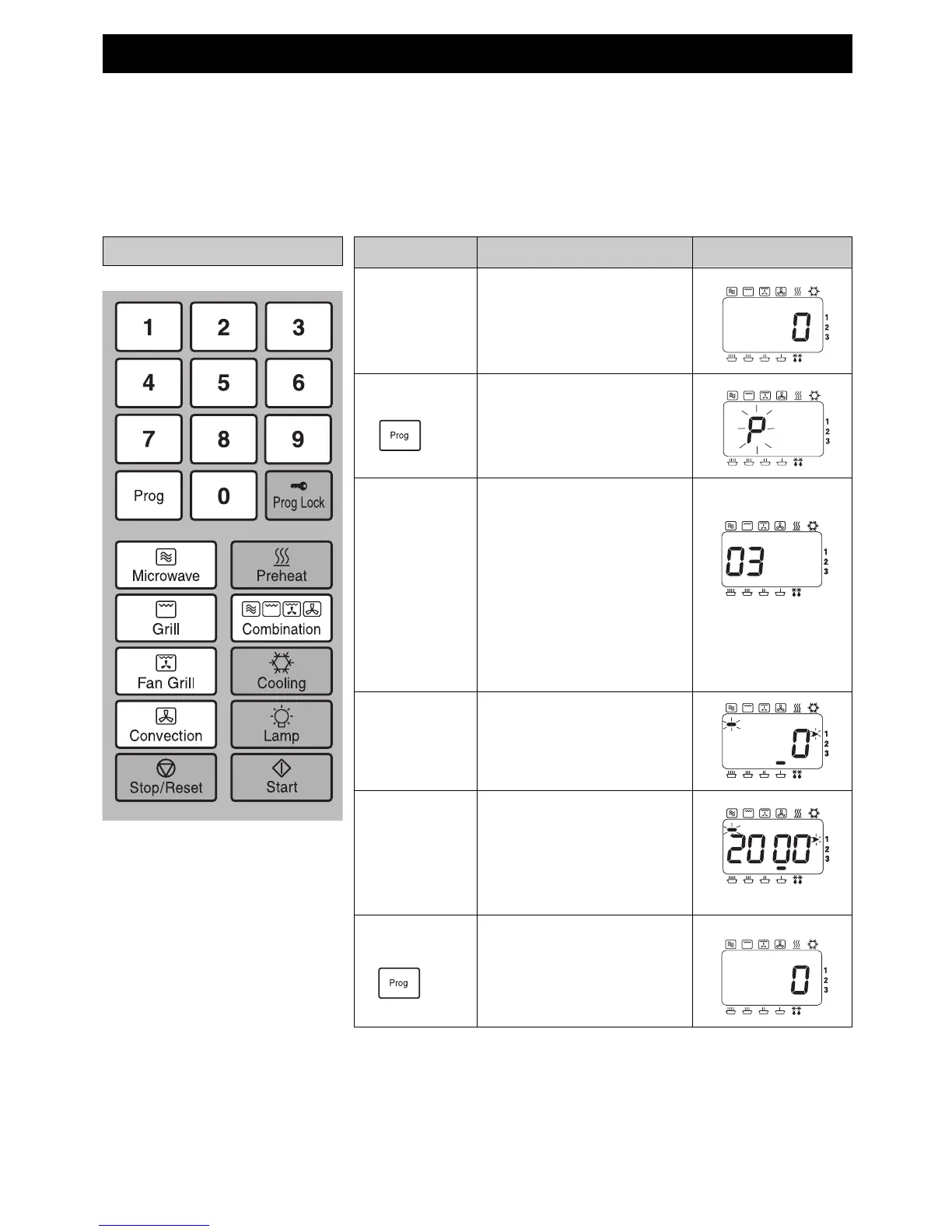
INFORMATION
ACTION
DISPLAY
1 Open Door. The oven lamp will come on.
2 Press
Prog Pad.
Keep pad pressed for
2 seconds until “P” is
displayed.
KEEP DOOR OPEN
3 Press
Programme
Number.
eg. To set Programme 03:
SIMMER 20 mins.
Press Number Pads 0 and 3.
If programme has been
previously set, this will appear
in the display.
If the programme memory is
empty then the programme
number will appear in the
display.
5 Select Time. eg. Press Number Pads 2, 0,
0, and 0.
After 3 seconds display
returns to “0”.
6 Press
Prog Pad.
4 Select
Power.
eg.Press Microwave Power
Pad 4 times.
Setting the Memory Programmes
Please ensure that the SD Memory Card is inserted in the Oven.
Your oven has 99 blank memory programmes for your own heating requirement.
All 99 Memory Programmes can be set manually using the Prog Pad on the Control Panel.
However, these programmes can be stored onto the SD Memory Card using your personal computer
(see pages 39 - 41).
Any programme information stored directly onto the SD Memory Card will override any manual programmes
previously set.


 To Next Page