EPG
To get to the EPG, press the EPG button. Pressing the same button brings you back to the channel you
watched last.
INFORMATION
The info button displays information about the programme you are watching. On most channels you will
see a description, channel and start and end time.
NAVIGATING THE MENUS
The arrow keys are used to navigate the menu. Your selection is conrmed with the OK button.
MENU BUTTON (also called panic button)
With the menu button you can make a quick reboot lasting only a few seconds.
THE REMOTE CONTROL
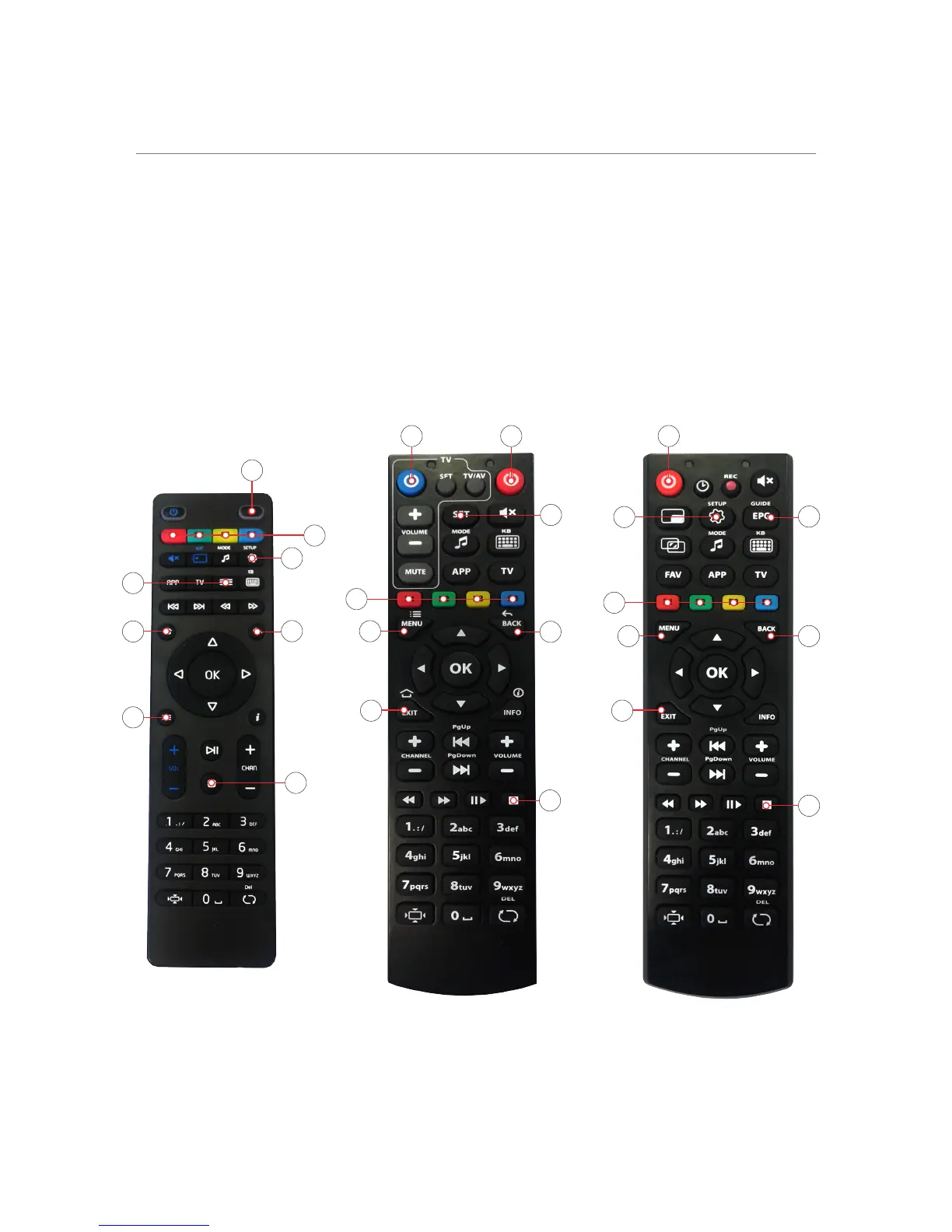
There are three different remotes for the MAG receiver - nd yours below
6 | The remote control - MAG
1
1 12
2
4
4
7 7
4
6
8
8
67
5
5
3
3
3
2
6
5
8
1
)
On / Off
2
)
EPG
3
)
Setup
4
)
Quick reboot
5
)
Used for functions in Catch-up
6
)
Back
7
)
Exit
8
)
Back to EPG


 To Next Page