Overview 7
Basic Operation
The following sections will introduce you to the basic functionality of the Magellan console.
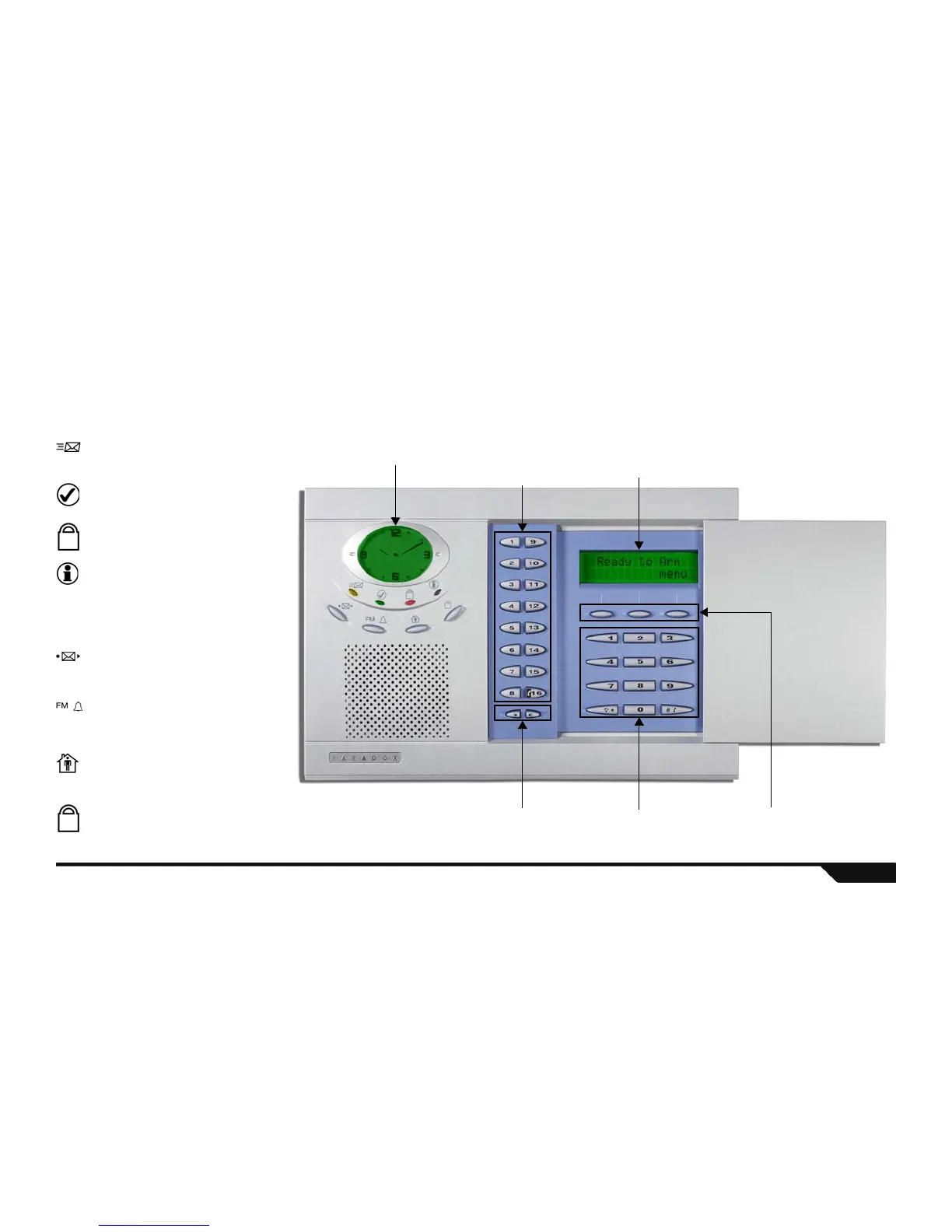
Figure 1: Basic Overview
Action KeysVolume Keys
LCD Clock Display Center Keypad
(see page 9)
Main Keypad
(see page 9)
Light Indicators:
Orange MESSAGE light
Flashing: A voice message has been recorded.
See Message Center on page 24.
Green READY light
ON: All zones closed. System can be armed.
Flashing: System in Exit Delay mode.
Red ARMED light
ON: System is armed.
Flashing: System is in alarm.
Orange INFORMATION light
ON: There is a trouble in the system, an alarm
has just occurred or a zone has been
bypassed.
Flashing: There is a power failure and the
Magellan console is receiving no power.
Function Keys
Message Key
Press once: play a recorded voice message
Press & hold: Record message
See page 24.
Radio Tuner / Alarm Clock Key
Press once: Turn ON/OFF radio (page 25)
Press & hold: Enable/disable alarm clock
(page 26)
Stay Arming Key
Press once: Enter user code to Stay arm
Press & hold: One-touch Stay arm
See page 13.
Regular Arm Key
Press & hold: One-touch Regular arm
See page 12.
LCD Screen
(see page 8)
Technical Manuals Online! - http://www.tech-man.comTechnical Manuals Online! - http://www.tech-man.com



 To Next Page