18
MAGNAMED Ventilator Analyzer - VentMeter P/N: 1901509 – Rev 05
o PEEP – Positive Expiratory End Pressure
o Pmax – Maximum Pressure
o Vminuto – Minute Volume
o Freq – Respiration Frequency (Rate)
o FiO2 – Inspired O
2
Fraction
• Monitor Screen (4): Monitored Parameters Selection II
o Tinsp – Inspiratory Time
o Texp – Expiratory Time
o I:E –I:E Ratio
o Vinsp – Inspired Volume
o Fmax – Maximum Flow
o Fmin – Minimum Flow
• Monitor Screen (5): Monitored Parameter Selection III
o Pmean – Mean Pressure
o Pmin – Minimum Pressure
o Pplat – Plateau Pressure
o Csta – Static Compliance
o Cdyn – Dynamic Compliance
o Raw – Airway Resistance
The 3, 4 and 5 monitor screen allows to select the parameters to be shown continuously. In these screens the
position of the arrow and the ENTER key selects or inhibits the parameter to be shown in the monitor screen.
The selected parameters will be blinking and the inhibit ones will not. To navigate between these parameters,
use the UP and DOWN keys.
It is possible to choose up to 6 (six) parameters to be shown in two monitor screens. Each monitor screen (1
or 2) can show up to 3 parameters simultaneously.
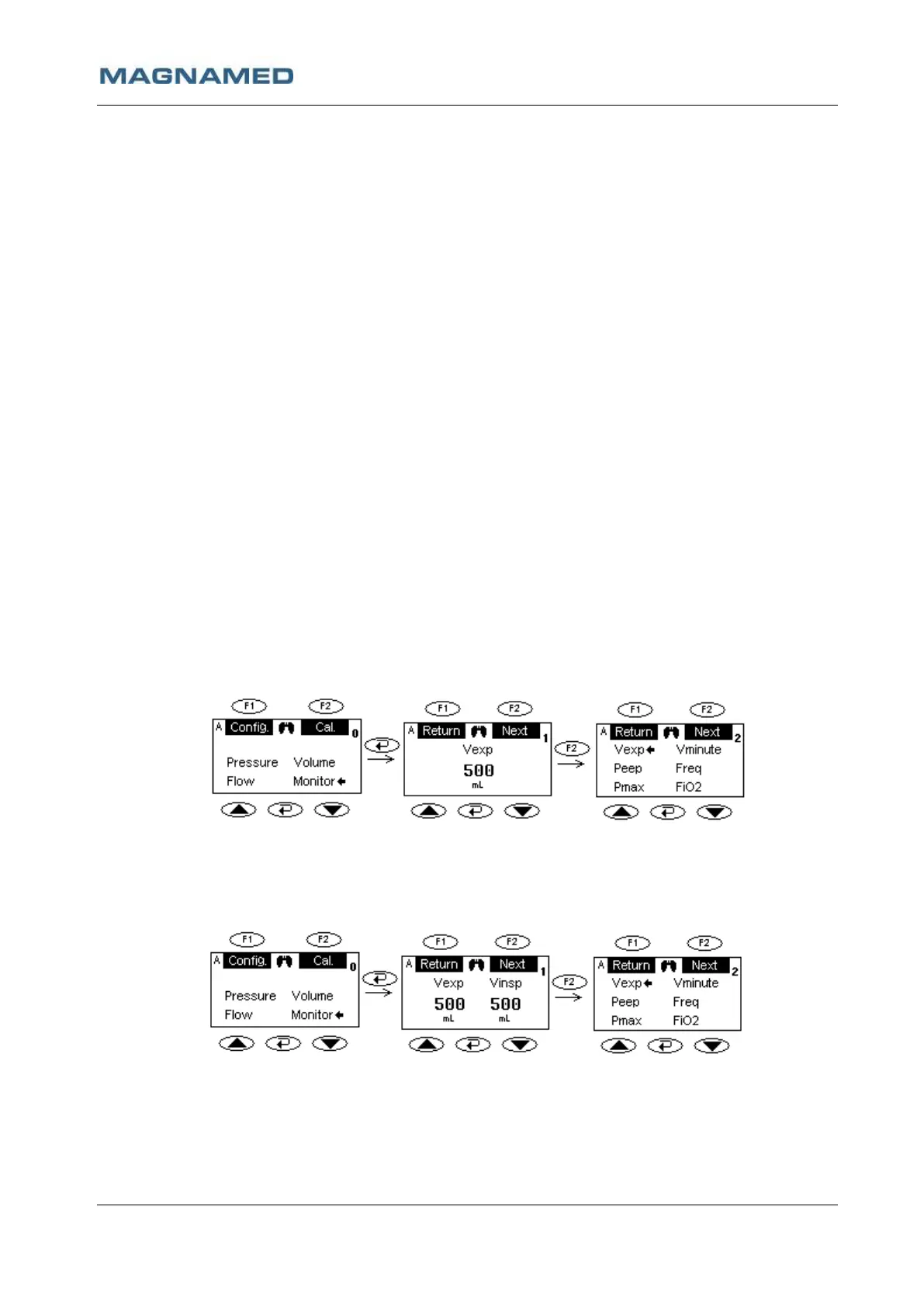
Example:
a. Vexp selection
In this case there will be only Monitor Screen (1) with the expired volume centralized in the screen.
By pressing F2, the presented screen will be Monitor Screen (3) and at superior right corner of the
screen will show number 2 indicating the distance in screens to the Main Screen.
b. Selecting Vexp and Vinsp
In this case there will be only Monitor Screen (1) with the expired volume in the left side of the screen
and the inspired volume in the right side of the screen.
c. Selecting Vexp, Vinsp and Freq


 To Next Page