Operation Manual
touchTymp MI 24
and
MI 34
Version
5.3 The Home Screen
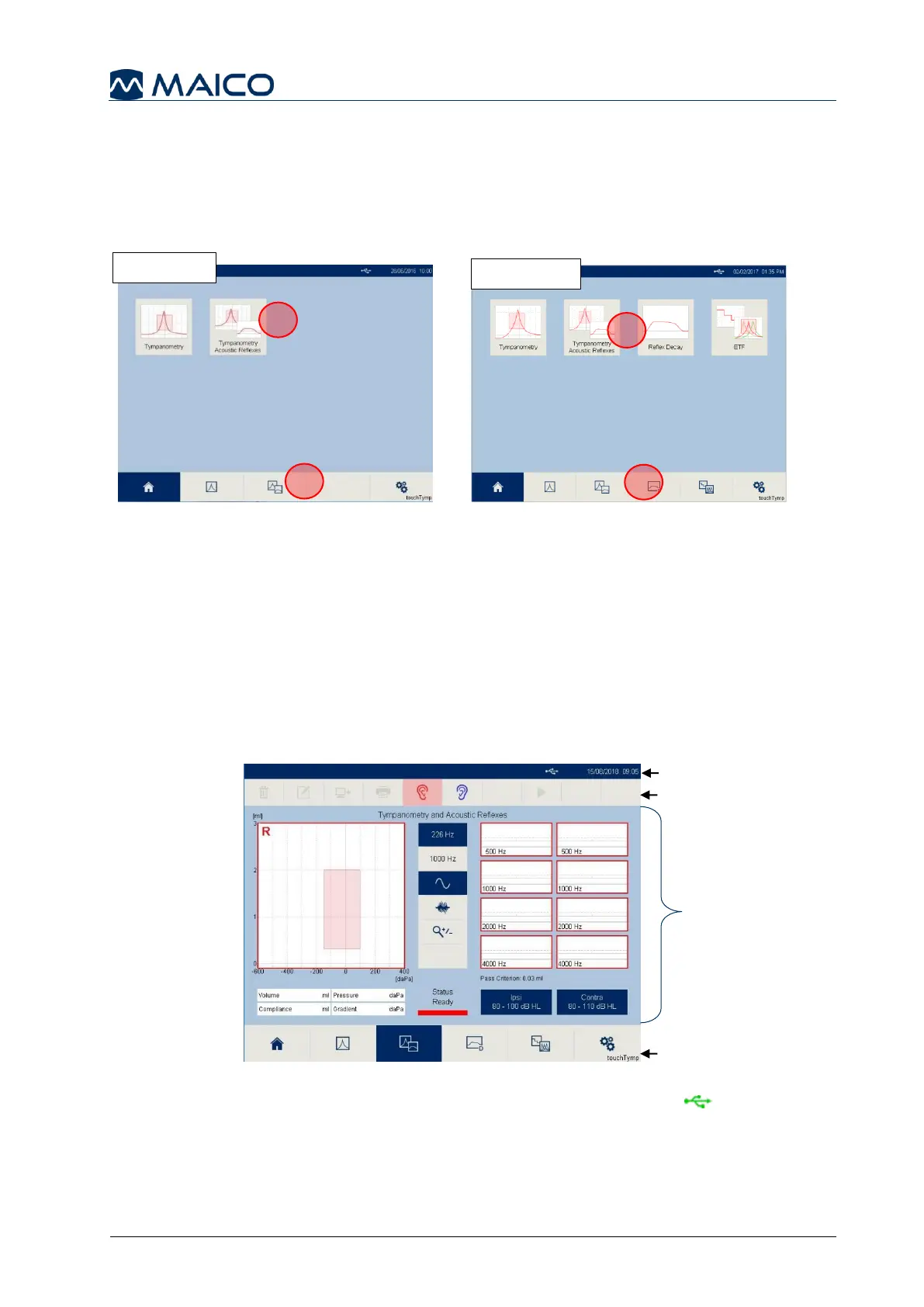
The Home screen displays the buttons controlling entry into the major functions of the
touchTymp. These functions include the specific test selection for MI 24 version (Figure
34) and MI 34 version (Figure 35).
To access the test, select the module from the Home screen (1) or Fixed Function Bar (2).
5.4 Immittance Testing
5.4.1 General
The following sections 5.4.2 to 5.4.5 offer information about the modules
Tympanometry, Tympanometry and Acoustic Reflexes (MI 24 and MI 34 version),
Reflex Decay, and Eustachian Tube Function (MI 34 version only).
5.4.2 The Screen Format
The general touchTymp screen format includes (e.g. Figure 36) the following:
Status Bar: displays the Date/Time and the status of PC-connection (highlighted
green if connected to PC-software and Module is running).
Tool Bar: A row of icons that activate key functions when selected. Some buttons in
the toolbar will be ghosted when not useable. These buttons will change based on test
or setting screen visible.


 To Next Page